If you’re moving from SCCM (Configuration Manager) to Microsoft Intune, one of the first things that catches teams off guard is the timing question: “I made a change — why hasn’t it hit the device yet?”
With SCCM, you had more direct control over deployment schedules and could see exactly what was happening in the pipeline. Intune works differently. It’s not slower by design — it’s built on a fundamentally different architecture. And once you understand how it actually works, both the current behaviour and the improvements Microsoft is rolling out make a lot more sense.
This post breaks down what happens from the moment you make a change in Intune to the moment a device reflects it — and what’s being done to close that gap even further.
Intune Is an Eventual Consistency System (And That’s by Design)
The first concept to get your head around is eventual consistency. Unlike SCCM’s more synchronous delivery model, Intune doesn’t push changes to devices instantly. Instead, devices converge to a desired state over time.
Think about using your laptop on a flight with no internet. Everything still works — your files, your apps, your settings — because the device operates independently. The moment you land and reconnect, everything reconciles seamlessly. That’s eventual consistency in action.
The trade-off is that until a device checks in, Intune doesn’t truly know its current state. Are there pending changes? Has something shifted locally? Is the device still compliant? All of that gets resolved at check-in time — which is exactly why check-in timing matters so much.
The Three Types of Device Check-Ins
Not all check-ins are the same. Intune buckets them into three main categories:
1. Single device check-ins These happen when an admin or user takes an explicit action on a specific device — for example, triggering a sync manually from the Company Portal or the Intune admin centre.
2. Client-initiated check-ins These happen in the background to keep devices healthy when nothing else is going on. They’re essentially the device saying “just checking in, anything new?” on a regular schedule.
3. Change-based check-ins (the Fast Lane) These are triggered when a service-side change happens that affects one or more devices. This is where most of the action is — and where Microsoft has been focused on driving improvements.
What Is the Intune Fast Lane?
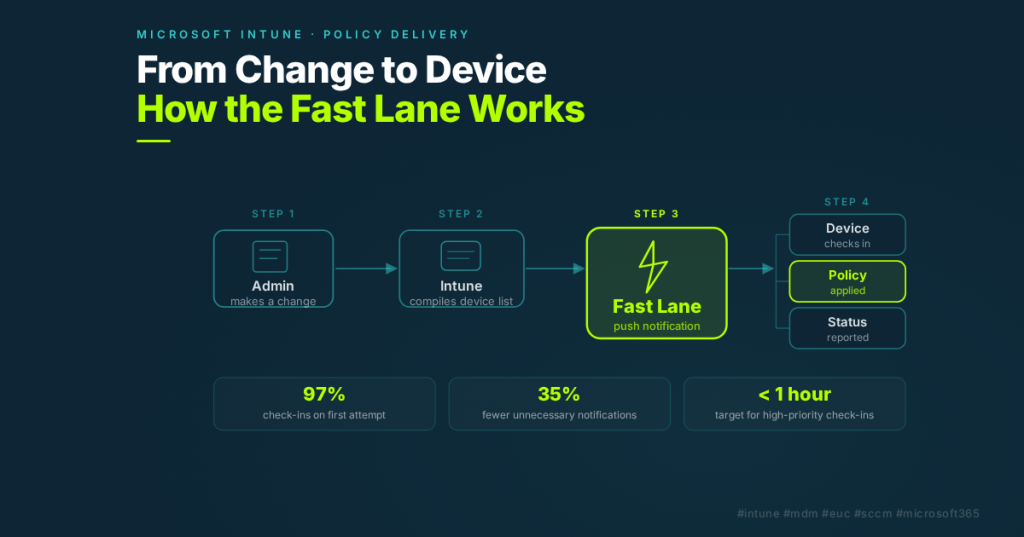
The Fast Lane is how Intune accelerates policy delivery when a change occurs. When a service-side change occurs, Intune sends a push notification to affected devices, instructing them to check in immediately rather than wait for their next scheduled check-in.
Four things trigger a Fast Lane notification:
- An admin modifies the targeting of a payload — for example, adding an Entra group to an existing policy assignment
- An admin modifies the contents of a payload — like changing a configuration value in a policy
- Entra group membership changes — when users are added or removed from groups that have policies assigned
- App updates from the store — automatic updates to assigned apps
The last two are worth flagging for teams coming from SCCM: these can happen entirely behind the scenes. A group membership change driven by HR provisioning, or an automatic app update, still triggers a Fast Lane notification from Intune’s perspective. It’s worth understanding that the system is reacting to more events than an admin might consciously initiate.
Where the Delays Actually Happen
The journey from admin change to device compliance looks like this:
- Admin makes a change
- Intune compiles the list of affected devices
- Intune sends push notifications to those devices
- Devices receive the notification and check in
- Intune applies the changes
- Devices report status back to the admin
Most of the latency sits in the handoff between step 3 and step 4 — between Intune sending the notification and the device actually checking in. That’s the seam Microsoft has been focused on closing.
The last-mile delivery of notifications relies on platform providers: WNS for Windows, APNS for Apple, and FCM for Android/Google devices. These are best-effort systems — not guaranteed — and can be affected by the device being offline, network issues, or platform delays. That part of the pipeline isn’t fully visible to Intune (or to you as an admin), which is something Microsoft has been working to address.
What Microsoft Has Been Improving
Here’s where it gets genuinely interesting for teams that have been frustrated with policy delivery timing. Microsoft has made — or is very close to releasing — five specific improvements to this pipeline.
1. Smarter, More Targeted Notifications
The system was sending a lot of noise. Around 40% of Fast Lane notifications didn’t result in any actual device changes. Meanwhile, 65% of all MDM check-ins also produced no changes. The system was accelerating check-ins for devices that didn’t need it, while potentially backing up devices that did.
The fix: Intune has overhauled its notification system to be far more precise about which devices actually need to check in. The result is a 35% reduction in unnecessary notifications and the ability to process 40% more sessions. Today, 97% of notification-based check-ins are handled on the first attempt.
That 97% sounds impressive — and at Intune’s scale, it is. But as Albert Caveo from the Intune team puts it: “If your water heater was working 97% of the time, you wouldn’t brag about the hot showers. You’d never forget that one cold shower.” The goal is to keep pushing toward 99.9%.
2. Intelligent Check-In Prioritisation
Previously, Intune’s prioritisation algorithm only distinguished between “maintenance” and “non-maintenance” check-ins. That meant a device falling out of compliance due to a detected threat competed equally with a routine background check-in from a healthy device.
The new model introduces a priority tier system based on impact. Devices with pending changes can now jump to the front of the queue when capacity limits are hit. And the system is moving from those two broad categories to explicit SLO-backed tiers — so a remote wipe or a new device enrolment will always get handled ahead of a background health check.
The goal: critical check-ins seldom need to retry, and high-priority check-ins complete within one hour.
3. No More Dropped Notifications
In the old model, Intune would send one Fast Lane notification per device per 30-minute window. If multiple changes came through in that window, additional notifications were simply dropped. They weren’t queued — they were gone. The device would catch up at its next scheduled check-in, which could be hours away.
The new system introduces per-device notification timers. When a change occurs, rather than firing a notification immediately, Intune starts a short timer (a couple of minutes). If more changes come in for the same device during that window, the timer extends slightly — up to 10 minutes — allowing the device to pick up all pending changes in a single check-in.
After notifying, if there are still more changes queued, Intune will always schedule another notification rather than dropping it. The practical outcome: every change you make will result in a push notification. No more changes silently falling through because of notification window collisions.
4. Fast Lane Expansion to More Payloads
The Fast Lane previously didn’t cover everything. Scripts, Win32/classic apps, custom compliance policies, and payloads delivered through the Intune Management Extension (IME) or MMPC gateway had inconsistent Fast Lane coverage.
That’s changing. Fast Lane notifications are being expanded to cover all gateways and all payload types, including IME-delivered content on both Windows and Mac. The experience will be consistent regardless of how a payload is delivered.
5. Better Windows Notification Reliability via IC3
For Windows specifically, Intune is adding a second notification channel alongside the native Windows notification service (WNS). The new channel uses IC3 — the same communications protocol that Microsoft Teams uses — delivered via the Intune Management Extension.
This gives Intune more control over end-to-end notification delivery on Windows, including delivery receipts, better diagnostics, and the ability to reason across all pending changes and device actions in one place. It also lays the groundwork for future capabilities like presence awareness and more targeted notifications.
The main thing you need to ensure on your end: keep your network and firewall rules up to date with the required Intune network endpoints. Microsoft publishes these, and they occasionally change as new capabilities roll out.
Bonus: iOS Maintenance Check-In Optimisation
For iOS specifically, Microsoft has redesigned how maintenance check-ins are handled. Previously, iOS devices had three service-initiated maintenance check-ins daily (roughly every eight hours), and during peak hours these were accounting for up to 40% of all Intune traffic — most of which produced no device changes.
The new model is smarter: during peak hours, if a device has already checked in recently, the maintenance check-in is deferred. During off-peak hours, it continues as normal. The result: 99.5% of changes to iOS devices are now delivered faster, while overall delayed check-ins across all platforms are reduced by 10%.
What This Means for Your SCCM Migration
If you’re mid-migration or planning one, here are the practical takeaways:
You don’t need to change how you work. All of these improvements are being built directly into the Intune platform. There are no configuration switches to flip or extra steps to take. They apply across the board.
Understand the model, not just the tools. The eventual consistency model is genuinely different from SCCM. Policies don’t hit devices the instant you save them — but with the improvements above, the window between “change made” and “device updated” is shrinking significantly for anything that matters.
Watch your network endpoints. The IC3/IME notification improvements require up-to-date firewall and network rules. Worth a check with your networking team if you’re seeing notification delivery issues.
Use the Fast Lane triggers intentionally. Know that changes to Entra group membership — not just explicit policy changes — trigger Fast Lane notifications. Factor that into how you design your group structures and assignment targeting.
Closing Thoughts
Intune timing has historically been one of the more frustrating aspects of the SCCM-to-cloud migration conversation. The “eventual” in eventual consistency felt a little too eventual at times. What’s encouraging about Microsoft’s current direction is that they’re not just adding more notifications or shorter timers — they’re building genuine intelligence into the system. Priority awareness, noise reduction, smarter notification timers — these are architectural changes, not patches.
For teams managing thousands of endpoints, the difference between “it’ll apply within the next maintenance window” and “critical changes apply within the hour” is meaningful. And that’s the direction Intune is heading.
Adapted from the Microsoft session “Intune timing demystified: what really happens behind the scenes” presented by Albert Caveo, Principal Product Manager, Microsoft Intune Core Platform team.
