Windows 11 26H2 landed in the Azure Marketplace in September, with multi-session images for Azure Virtual Desktop and new gallery images for Windows 365. Not long after, one admin on Reddit put it on their own machine, opened winver, and found that was the only thing that had changed.
They weren’t wrong. 26H2 is an enablement package. It shares a codebase and a servicing branch with 24H2 and 25H2, so most of what’s “in” it has been arriving in monthly updates all year. The package flips the switch.
So don’t look for a feature reason to rebuild your golden image this month. There isn’t much of one. The better reason is in the support dates. This post covers why the move is worth making, why I wouldn’t let a feature update policy make it for you on pooled hosts, and the way I’d actually do it: a validation host pool, a week of real users, and a rollback that’s one click rather than one weekend.
The real reason to move: the clock, not the features
Here are the end-of-servicing dates for Enterprise and Enterprise multi-session, straight from Microsoft’s release information page:
| Version | Build | End of updates (Enterprise / multi-session) | |—|—|—| | 23H2 | 22631 | 10 November 2026 | | 24H2 | 26100 | 12 October 2027 | | 25H2 | 26200 | 10 October 2028 | | 26H2 | 26300 | 9 October 2029 |
Two rows matter.
The first is 23H2. If you still have a pooled host pool running a 23H2 multi-session image, you have about five weeks of security updates left. That pool is your priority this month, not the shiny new one. And because 23H2 is on a different codebase, it isn’t an enablement package jump for you; it’s a proper image rebuild.
The second is 26H2. The image buys you support into October 2029. If you’re on 24H2 today, that’s two extra years on a build you’d be rebuilding at some point anyway. So pick your quietest month. October is fine. A January change freeze is not.
Why I wouldn’t let a feature update policy do it
On a physical laptop, letting Windows Update or Windows Autopatch roll out the enablement package is exactly what it’s designed for. On a pooled multi-session host, it’s the wrong tool. Microsoft now says so in writing.
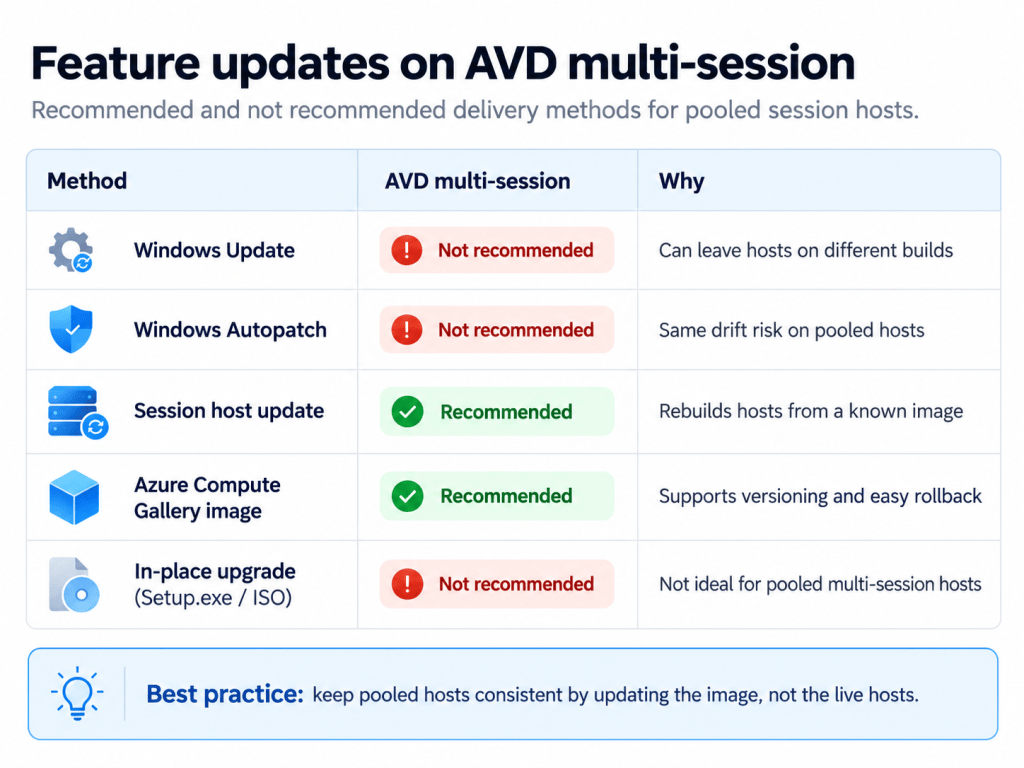
At the end of August, Microsoft published an AVD page on update methodologies for session hosts. For feature updates on Windows multi-session, Windows Update and Windows Autopatch are both marked Not recommended. Session host update and Azure Compute Gallery images are marked Recommended. In-place upgrades from Setup.exe or an ISO are Not recommended either.
The reason is drift. A pooled host pool works because every host is the same. The load balancer doesn’t care which host a user lands on, and neither should the user. The moment some hosts take a feature update in place and others don’t (because they were shut down by autoscale overnight, or the install failed on one, or the reboot was deferred), you have two builds in one pool. The user who hits a problem on Tuesday might not hit it on Wednesday. That’s a nightmare to troubleshoot.
There’s also the next re-image to think about. If the hosts updated themselves to 26H2 but the golden image is still 25H2, the next time you re-image or autoscale builds a fresh host, it comes back on 25H2. You’ve gone backwards. Nobody touched a thing.
It’s worth checking which policy your session hosts actually sit in. A loosely written dynamic group is all it takes for pooled hosts to land in the same Intune feature update ring as the laptops. This week an r/Intune thread reported Autopatch devices pinned to 25H2 moving to 26H2 anyway. I haven’t reproduced that one, but it’s a good reason to keep pooled hosts out of that ring entirely.
Step 1: Build the 26H2 image next to the old one, not over it
The Marketplace SKUs you want are:
win11-26h2-avd(offerwindows-11): Windows 11 Enterprise multi-sessionwin11-26h2-avd-m365(offeroffice-365): the same, with Microsoft 365 Apps
You can confirm what’s available in your region with:
az vm image list-skus --publisher MicrosoftWindowsDesktop --offer windows-11 \ --location uksouth --query "[?contains(name,'26h2')].name" -o tsv
Build a new image VM from that, then layer your apps and config on exactly as you did for the current image. If you build with a custom image template or a pipeline, this is a parameter change. If you build by hand, I’d use this as the excuse to write the build down, because a rebuild from a fresh Marketplace image is when you find out which settings only ever lived in somebody’s memory.
Publish it as a new version in Azure Compute Gallery and leave the current version alone. That previous version is your rollback, so don’t let a retention policy delete it the following week. I’d keep at least one known-good version until 26H2 has been in production for a full patch cycle.
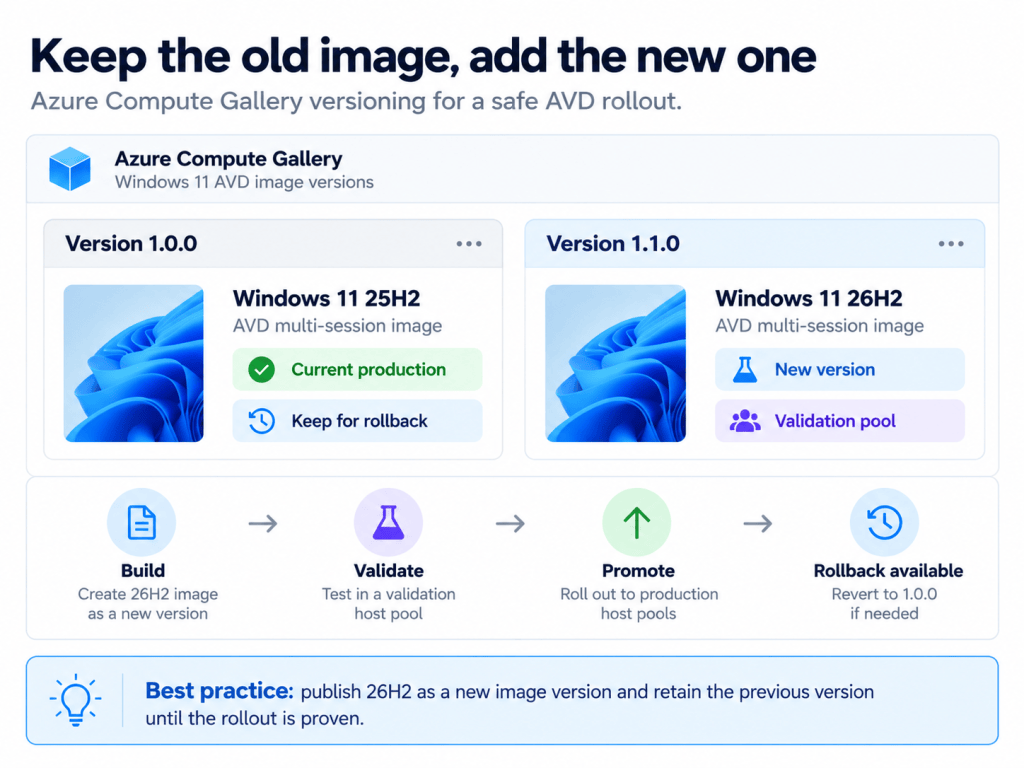
If you run Nerdio Manager, the same idea is built in. Desktop image versions are retained (you set how many to keep), and staging lets you put a new version alongside the active one and test it before you activate it. The current version stays as your backup.
Step 2: A validation host pool with real users
A test VM you log into yourself proves the image boots. That’s all it proves.
I’d recommend a small validation host pool built from the 26H2 image, with the same host pool settings, session limits, RDP properties, and app groups as production. Then put real users in it: five to ten people from different teams, including at least one from whichever team uses the awkward line-of-business app. Give them a week. That’s long enough to catch the things that only happen once a week: the Monday report, the Friday month-end macro.
If you’d rather not run a separate pool, you can add one or two 26H2 hosts to a production pool in drain mode and steer a test group to them. It works. It’s also the drift problem again, on purpose this time. I’d only do it if the pool is small and you’re watching it closely.
Step 3: The test checklist
This is the list I’d work through before anything goes to production. It’s not exhaustive; your own app estate decides the rest.
- Line-of-business apps. Launch them, and do a real task in each, not just a splash screen. Anything with a licence server or a driver deserves extra attention.
- Profile attach and sign-in time. Sign in, sign out, sign in again. Compare sign-in times against the current pool. If sign-in has gone from 30 seconds to 90, find out why before the users do.
- Teams and media optimisation. A call with screen share and video, from the Windows App and from the web client if you support both.
- Printing and redirection. Printers, scanners, USB devices, clipboard and drive redirection, whatever your RDP properties allow.
- App attach packages. If you use them, confirm every package still mounts and registers.
- Security tooling. Defender for Endpoint onboarding, your EDR, and any baseline you apply. Check the host shows up correctly in the portal, not just that the service is running.
- Policy and layout. Start menu, taskbar, default apps, and anything else set by Intune or Group Policy. Settings occasionally move between releases.
- The image build itself. If sysprep or the capture failed and needed a retry, write down why. The classic is a Store app that updated in one user’s profile on the image VM.
- Monitoring and reporting. Any query, workbook, or compliance rule keyed to a build number. 26H2 is build 26300, so a check for 26200 will start flagging your new hosts as out of date.
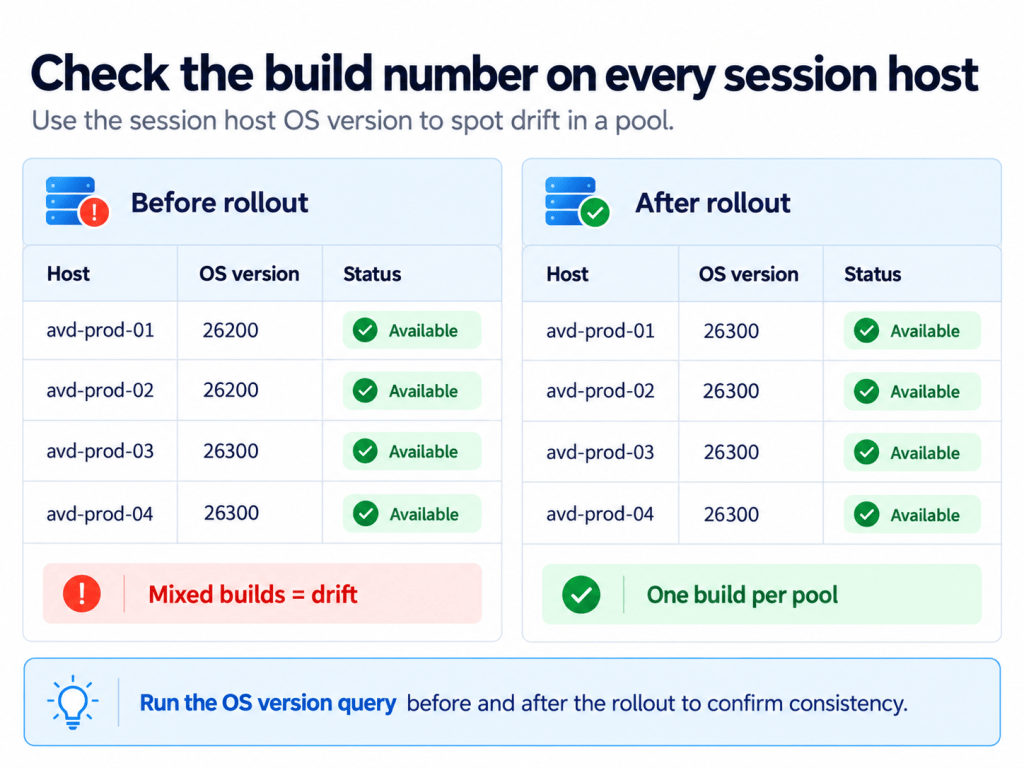
To confirm what every host in a pool is actually running, the session host resource reports its OS version:
az rest --method get \ --url "https://management.azure.com/subscriptions/$SUB/resourceGroups/$RG/providers/Microsoft.DesktopVirtualization/hostPools/$POOL/sessionHosts?api-version=2024-04-03" \ --query "value[].{host:name, os:properties.osVersion, status:properties.status}" -o table
Run it before and after the rollout. You want one build number per pool.
Step 4: Roll it out with your normal image update
Once the validation week is clean, I wouldn’t invent a special process for 26H2. Use your monthly image update. Whether that’s session host update, a re-image schedule in Nerdio Manager, or your own pipeline, the whole point is that it’s a process you trust and have run before.
A few things I’d do differently from a normal month:
- Go pool by pool. Start with the pool that has the fewest line-of-business apps and the most forgiving users, and finish with the one that keeps you up at night.
- Roll out midweek. Tuesday or Wednesday gives you working days either side to spot problems. A Friday rollout means the first real users are on Monday morning, which is the bad Monday this post is named after.
- Remember that image-based servicing replaces the VM. Microsoft’s docs say it plainly: user data and local storage on the session host isn’t kept. On a well-built pooled pool that’s the design, but if anything has quietly started writing to the local disk, you’ll find out now.
Step 5: Rollback is a version number
If something breaks after rollout, the fix is to point the host pool back at the previous image version and re-image. That’s it. You don’t uninstall anything, and you don’t hope the rollback option is still there in Settings.
That’s why Step 1 matters. The rollback only exists if the old version is still in the gallery and you know which version number it is. Write it down in the change record before you start.
A note for Windows 365
Windows 365 has three 26H2 gallery images: Windows 11 Enterprise, Windows 11 Enterprise + Microsoft Apps, and the new Developer Configuration + M365 Apps image, which went GA in September. Changing a provisioning policy’s image affects newly provisioned or reprovisioned Cloud PCs, not existing ones, so the same principle applies in a different shape. Test the image on a small group before you switch the policy everybody provisions from. Existing Cloud PCs are single-session and do take feature updates through Windows Update or Autopatch, so the ring question is different there.
Not exciting, and that’s fine
The value of 26H2 is two more years of support and nothing much changing for your users, which is exactly what you want from a golden image.
Three things I’d do this week:
- Check for 23H2 multi-session first. 10 November 2026 is close.
- Keep pooled hosts out of feature update rings. Microsoft’s own table marks them Not recommended for multi-session.
- Build 26H2 as a new image version, give it a week with real users, and keep the old version until you’re sure.
I’d love to hear how others are timing this one. Are you moving now, or waiting until after the new year?
