The Well-Architected Framework for Azure Virtual Desktop is genuinely good documentation. Five pillars, dozens of concrete recommendations, all the right guidance on scaling plans, FSLogix redundancy, Trusted Launch, Private Link, and the rest. If you run AVD at any scale, you’ve probably read it at least once.
So why do so many AVD estates still drift away from it?
The problem was never the guidance. It’s that turning a framework into an actual answer for your environment has, until now, meant one of three things: pay for a commercial assessment tool, sit through a manual review where someone clicks around the portal for a day, or (let’s be honest) do nothing and hope the next outage isn’t the one the framework warned you about.
I got tired of that gap, so I built something to close it. This post is what it is, the problem it solves, and how it works under the bonnet.
The problem, stated plainly
A framework is a checklist you have to apply yourself. The WAF for AVD tells you that pooled host pools should have a scaling plan, that multi-session hosts want Premium SSD, that public network access on a host pool is rarely necessary in an enterprise with site-to-site connectivity. All true. All useful.
But “apply this 80-page framework to a five-subscription estate, by hand, every quarter” is not a realistic ask for a team that already has a day job. The guidance is free; the act of operationalising it isn’t. That’s the bit that was missing: a free, automated way to take the framework and produce an answer you can act on and hand to a sponsor.
What AVD-Assess actually is
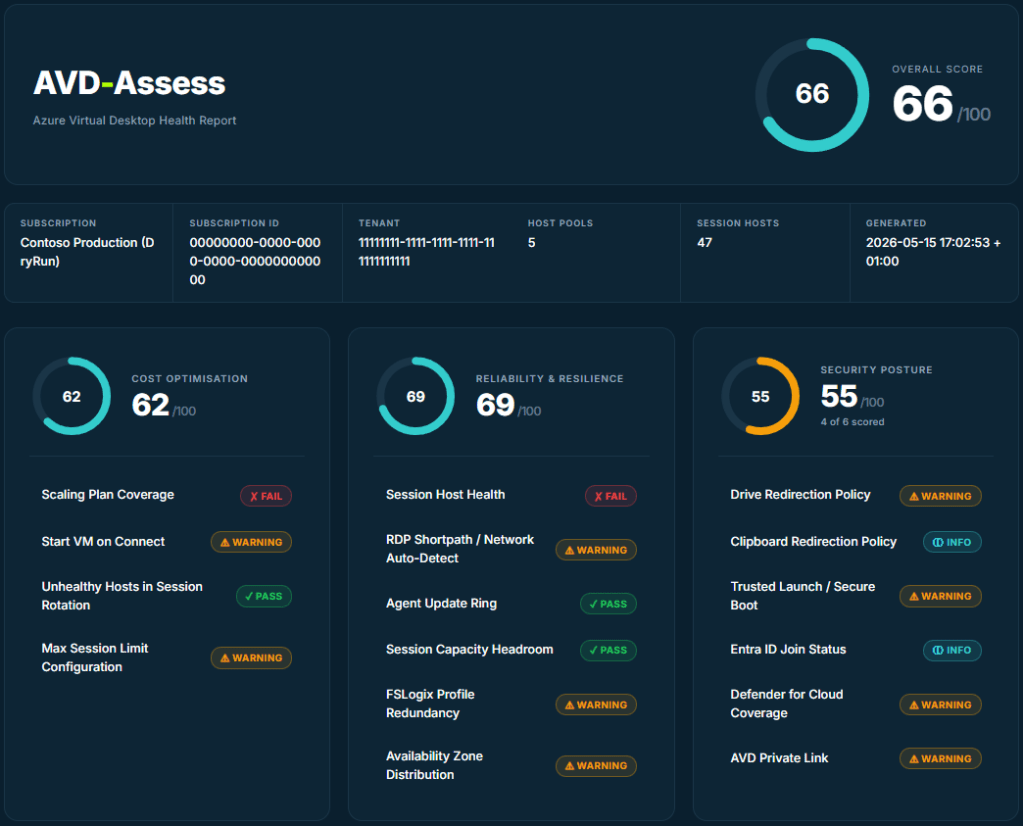
AVD-Assess is a single PowerShell script. You point it at a subscription, it connects, reads your AVD environment, runs 25 best-practice checks across all five WAF pillars (Cost, Reliability, Security, Operational Excellence, and Performance Efficiency), then writes a self-contained HTML report with traffic-light scoring and specific remediation for every finding.
No agent. No install beyond the Az modules you almost certainly already have. Nothing leaves your tenant. It’s MIT-licensed and lives on GitHub. A run takes about five minutes.
The part I care about most is that every finding is specific. Not “consider reviewing your scaling plans”. Instead:
0 of 5 pooled host pool(s) have a scaling plan. Uncovered: Ar-TEST1, CS-Multisession, QKEntra, RF-EntraIDOnly, RF-MultiSession.
followed by exactly what to do about it and a link to the relevant Microsoft Learn article. A finding you can’t act on isn’t a finding. It’s a feeling.
How it works
The flow is deliberately boring, because boring is reliable:
# One-time: install the modulesInstall-Module Az.Accounts, Az.DesktopVirtualization, Az.Compute, Az.Monitor, ` Az.Resources, Az.Network, Az.Storage, Az.Security -Scope CurrentUsergit clone https://github.com/waynebellows/AVD-Assess.gitcd AVD-Assess./AVD-Assess.ps1 -OpenReport
It signs you in, or reuses your existing context with -UseExistingConnection, which is handy in Azure Cloud Shell where you’re already authenticated. It then collects everything up front: host pools, session hosts, VMs, NICs, disks, diagnostic settings, Defender pricing, private endpoints. Every check reads from that one snapshot rather than making its own calls, so a run is consistent and doesn’t hammer the API.
Permissions are intentionally modest. Reader on the subscription covers the bulk of it. Two checks want a little more scope (Defender for Cloud coverage and Service Health alerts), and if they don’t have it, they degrade to an informational result rather than failing the run. A tool that needs Owner to tell you about your scaling plans is a tool nobody runs.
The scoring model
Each check returns a status and a score from 0 to 100:
- Pass (green): meets best practice.
- Warning (amber): a partial gap.
- Fail (red): a real cost, reliability, or security risk.
- Info (teal): couldn’t be evaluated, or doesn’t apply to this environment.
Category scores are the average of the scored checks; the overall score is the average of the categories. The design decision I’m most pleased with is how Info is handled: it’s excluded from the averages entirely. If a VM fetch failed on a permissions boundary, the affected checks go Info, and the report says 4 of 6 scored next to the donut instead of quietly pretending a green ring is the whole story. A score that flatters you is worse than no score.
What it checks, across the five pillars
A flavour rather than the full list:
- Cost: scaling plan coverage on pooled pools, Start VM on Connect, unhealthy hosts still accepting sessions, max session limits.
- Reliability: session host health, RDP Shortpath, agent update rings, availability-zone spread, FSLogix profile redundancy.
- Security: drive and clipboard redirection, Trusted Launch and Secure Boot, Entra ID join status, Defender for Cloud coverage, AVD Private Link.
- Operational Excellence: diagnostic settings flowing to Log Analytics, resource tagging, Service Health alerts, load-balancing algorithm.
- Performance Efficiency: Accelerated Networking, Premium OS disks on multi-session hosts, Gen2 VMs, FSLogix region colocation.
Every one names the affected resources and links to the official documentation, so the report is the start of the fix, not just a verdict.
From a snapshot to a trend
A one-off score tells you where you are. It doesn’t tell you whether you’re getting better, and “is this improving?” is the question a sponsor actually asks. Running the London Marathon taught me that a single training run means very little; the line through all of them means everything. The same is true of an estate’s health.
So the latest version turns AVD-Assess from a snapshot into a tracking tool. It can emit a structured, versioned JSON document alongside the HTML, ready to feed into a dashboard or a pipeline gate. Point it at a previous JSON report and every score, down to the individual check, gets a movement badge: improved, regressed, or unchanged. New checks are flagged; checks no longer assessed are listed separately so nothing silently disappears between runs.
# Baseline today./AVD-Assess.ps1 -UseExistingConnection -OutputFormat Both -OutputPath .\avd.html# Next month, see what moved./AVD-Assess.ps1 -UseExistingConnection -OutputFormat Both -CompareTo .\avd.json
Real estates also span more than one subscription: production, development, disaster recovery. There’s a sweep mode that assesses every subscription your identity can see in a single pass, writes a report per subscription, and produces a roll-up landing page. A subscription you can’t read is skipped with a reason rather than aborting the whole run, because one inaccessible subscription shouldn’t cost you the other four.
Why it’s free and open source
Because the framework is free, and the tooling to apply it should be too. There’s also a selfish reason: open source means the checks get scrutinised, and scrutinised checks are trustworthy checks. If you disagree with how a threshold is scored, you can read exactly how it’s calculated and tell me I’m wrong. That’s the point.
It’s not a replacement for knowing your environment. It won’t catch everything, and a green score is not a certificate of perfection. It’s the absence of the specific problems it knows how to look for. Treat it as a fast, honest first pass that frees you up to think about the things a script can’t.
Where to start
Clone it, run it against a development subscription first, and look at your lowest-scoring pillar. Pick one finding. Fix it. Run it again next month and watch that arrow go green. That loop (measure, fix one thing, then measure again) is worth more than any single report.
It’s on GitHub here: https://github.com/waynebellows/AVD-Assess
If you run it and something’s wrong, or a check should score differently, open an issue. I’d genuinely rather hear it.
