Once desktop image management is standardised, most teams turn their attention to the next operational challenge: Windows patching.
This is where many Azure Virtual Desktop environments begin to struggle.
Manual patching is time-consuming, disruptive, and inconsistent. It often relies on individual knowledge, late-night maintenance windows, and a degree of luck. Highly effective admins take a different approach — they design patching as an automated, repeatable lifecycle, not a monthly fire drill.
This is Habit #2.
Why patching becomes a bottleneck at scale
In smaller environments, manual patching can feel manageable. As environments grow, the cracks start to show.
Common symptoms include:
- Hosts patched at different times
- Inconsistent patch levels across pools
- Long or unpredictable maintenance windows
- Uncertainty about what’s actually been updated
The real issue isn’t effort — it’s risk. Inconsistent patching weakens security posture, complicates troubleshooting, and undermines confidence in automation elsewhere.
The mindset shift: patching is a workflow, not a task
Highly effective admins don’t think about patching as:
“Applying updates to machines.”
They think about it as:
“A controlled workflow that updates images and hosts predictably.”
That shift matters.
When patching is treated as a workflow, you gain:
- Predictability
- Auditability
- Confidence to automate safely
This is where Nerdio Manager for Enterprise becomes an enabler rather than just a scheduling tool.
One size does not fit all: patching strategy depends on host pool type
One of the most common mistakes I see is applying the same patching strategy to every host pool, regardless of how it’s used.
Highly effective admins make a clear distinction based on host pool type.
Multi-session (pooled) host pools
For multi-session environments, the recommended approach is simple:
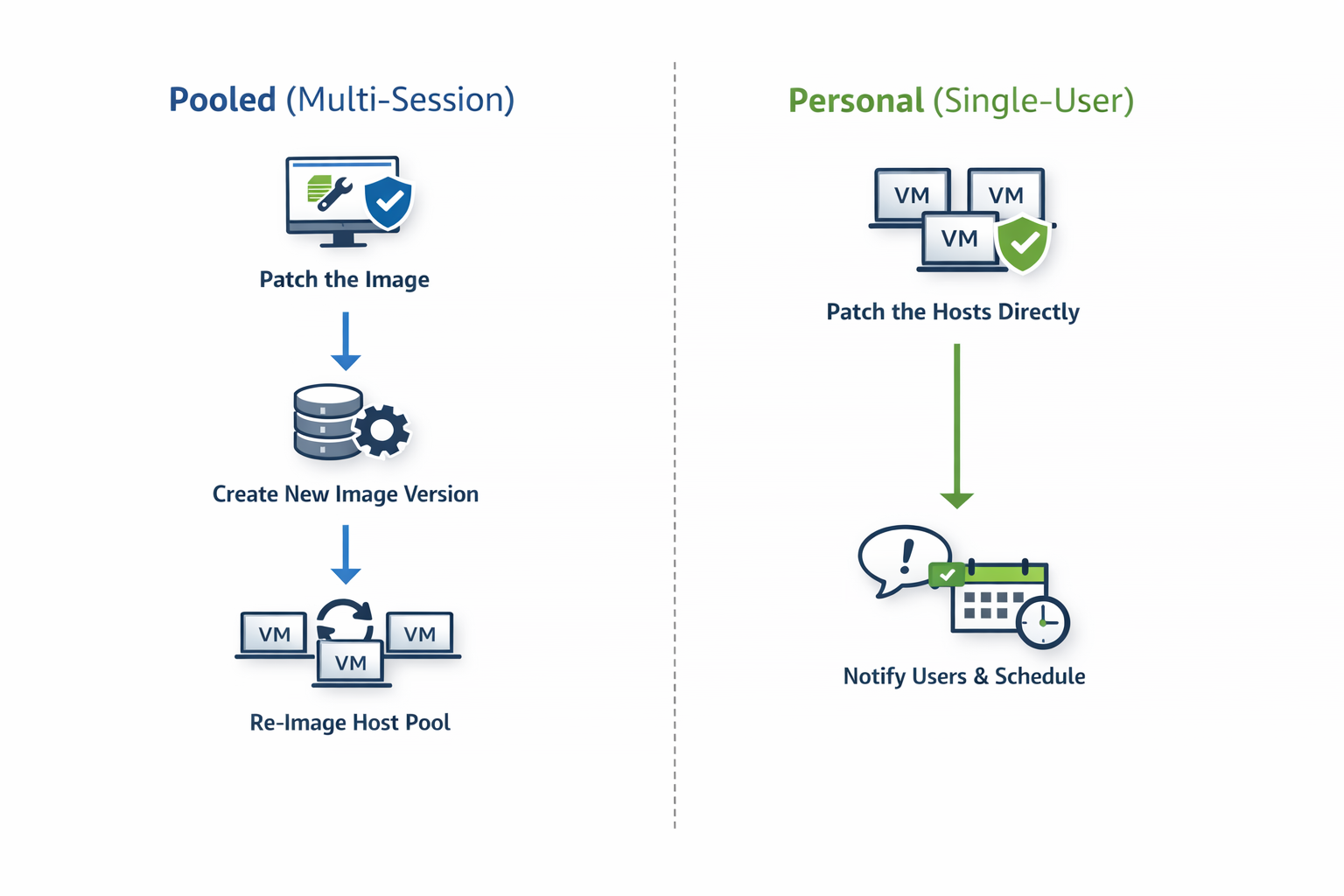
Patch the desktop image and re-image the session hosts
This aligns naturally with how pooled AVD environments are designed.
Why this works so well:
- Session hosts are disposable by design
- User data lives outside the VM (for example, FSLogix)
- Re-imaging restores a clean, known-good baseline
This approach delivers:
- Consistent patch levels across all hosts
- Faster recovery from issues
- Cleaner environments over time
In mature pooled environments, re-imaging is not disruptive — it’s expected.
Personal host pools
Personal desktops are fundamentally different.
Because:
- Each VM is tied to an individual user
- Local applications or user-specific state may exist on the VM
The recommended approach is:
Patch the session hosts directly
Re-imaging personal desktops can introduce unnecessary risk and user disruption. Patching hosts in place preserves:
- User data
- Personal configuration
- Application state
When combined with:
- Drain mode
- User notifications
- Controlled scheduling
…this approach keeps personal desktops secure without breaking the user experience.
The guiding principle
Highly effective admins follow a simple rule:
- If the host is disposable → patch the image and rebuild
- If the host contains user state → patch the host directly
This decision is baked into their operating model, not revisited every month.
Why Patch Tuesday still matters
Automation doesn’t mean patching at random.
Highly effective admins align patching to:
- Microsoft’s Patch Tuesday cadence
- A predictable offset (for example, a few days later)
- Known maintenance windows
This creates:
- Operational rhythm
- Predictable change windows
- Fewer surprises for users and support teams
Automation doesn’t remove control — it formalises it.
Automating the host lifecycle safely
Patching doesn’t exist in isolation. It directly affects:
- Host availability
- User experience
- Auto-scale behaviour
That’s why effective admins automate patching together with host lifecycle controls, such as:
- Draining sessions before maintenance
- Controlling concurrency
- Aborting safely after defined failures
- Re-imaging hosts in a controlled sequence
The objective isn’t speed — it’s controlled change at scale.
The operational payoff
When patching and host lifecycle management are automated correctly:
- Hosts remain consistent
- Security posture improves
- Maintenance becomes predictable
- Admin effort drops dramatically
More importantly, teams gain confidence to:
- Scale environments
- Trust automation
- Focus on optimisation rather than upkeep
How this builds on Habit #1
Habit #2 only works because Habit #1 exists.
Without:
- Standardised images
- Versioning
- Clear governance
…patch automation becomes risky.
With those foundations in place, patching becomes:
- Safe
- Repeatable
- Boring (in the best possible way)
Final thoughts
Highly effective Nerdio admins don’t patch reactively.
They:
- Choose the right patching strategy per host pool
- Align to predictable schedules
- Automate patching as a lifecycle
- Let the platform do the heavy lifting
This is where operational maturity starts delivering real returns.
This article is part of an ongoing series exploring the 7 Habits of Highly Effective Nerdio Admins. Upcoming deep-dives will cover application management, autoscale optimisation, right-sizing, and cost visibility.

Leave a comment