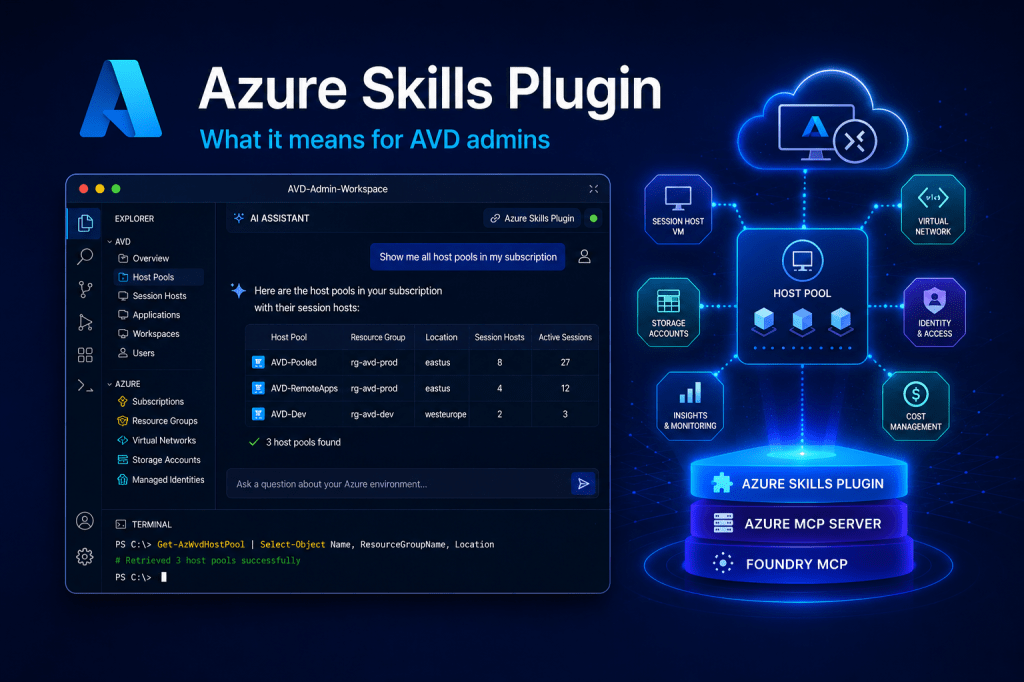
Picture a normal AVD admin morning. A user can’t connect. You want to know which session host they’re on, whether that host is even healthy, how many other people are sharing it, and whether the host pool has spare capacity. None of that is hard. But answering it means a portal tab for the host pool, another for the session hosts, a PowerShell window for the session list, and possibly Cost Management in a fourth tab to check you’re not bleeding money on hosts nobody is using.
Microsoft now has an answer to that, and it’s bigger than I expected. The Azure Skills Plugin, released in beta earlier this year and currently sitting at version 1.1.48, packages curated Azure expertise, the Azure MCP Server and the Foundry MCP server into a single install. You can drop it into Claude Code, GitHub Copilot, VS Code, the Copilot CLI or Cursor. One package, about a minute to install, and your AI agent suddenly knows how Azure work actually gets done.
What the Azure Skills Plugin actually is
Microsoft frames the launch this way: “Azure work is not just a code problem. It is a decision problem: which service fits this app, what needs to be validated before deployment, which tools should run, and what guardrails matter.”
That’s a useful sentence, because it gets at what’s been missing. The Azure MCP Server, on its own, gives an agent the hands to operate Azure. 200+ tools across 40+ services, all callable through the Model Context Protocol. But hands without a brain produce confident nonsense. The agent can run a Resource Graph query, but it doesn’t know which query, or what to do with the result, or which guardrail you’d want checked first.
The Azure Skills Plugin bundles three things into one install to fix that:
- The skills layer. 19+ curated Azure skills covering build and deploy (
azure-prepare,azure-validate,azure-deploy), troubleshoot and monitor (azure-diagnostics,azure-resource-lookup,azure-quotas), optimise (azure-cost,azure-compute,azure-resource-visualizer) and cross-domain work (azure-rbac,azure-storage,entra-app-registration). This is the expertise layer. Workflows Microsoft engineers actually use. - The Azure MCP Server. The 200+ tools that do the real work. The same server I’d previously have written about on its own.
- The Foundry MCP server. Extra tools for Microsoft Foundry scenarios like model discovery and deployment. Less relevant for AVD work, but it’s in the box.
Microsoft is explicit that this “is not a prompt pack. It is a packaged Azure capability layer”. The distinction matters. Prompt packs make an agent sound informed. This makes an agent actually competent at a set of Azure tasks, because the skills know what to check, in what order, and what tools to call.
A note for anyone nervous about pointing this at production. Authentication is Entra ID, and every call runs in the context of the signed-in user, bound by Azure RBAC. The agent can’t do anything you couldn’t do yourself in the portal. If your account is read-only on a subscription, so is the agent.
The part that matters for EUC
The honest bit first: there is no dedicated AVD skill in the bundle today. The 19 curated skills are organised around general Azure work like cost, deployment and diagnostics, not the AVD lifecycle specifically. But the Azure MCP Server underneath does ship a dedicated Azure Virtual Desktop tool namespace, virtualdesktop, and it currently does three things, all of them about visibility:
- List host pools in a subscription or resource group
- List session hosts in a host pool
- List user sessions on a specific session host
So with the plugin installed you can type things like:
“Show me all host pools in my subscription.”
“List the session hosts in the production-hostpool host pool.”
“What users are connected to session host avd-prod-04 in host pool production-pool?”
You get a straight answer in the chat panel, with no portal navigation and no pausing to remember whether it’s Get-AzWvdSessionHost or Get-AzWvdUserSession this time.
The AVD surface today is mostly a window onto your estate rather than a control panel for it. The agent can see everything: every host pool, every session host, who’s logged in where. It can also stop and start session hosts, since those are just virtual machines underneath. What it can’t do is the AVD lifecycle work you’d actually reach for, like draining a host before patching, signing out a stuck session, or scaling a pool up before Monday morning. None of that has shipped yet.
That sounds like a limitation, and it is. But read-first is the right order. An AI agent with unattended write access to your session hosts is a genuinely bad failure mode, and “show me my estate accurately” is the capability you’d want to trust before any other.
Where it gets useful: skills working together on your AVD estate
The three AVD tools on their own are convenient. The reason the plugin format matters is what happens when the skills layer pulls those tools together with everything else.
Take the questions you actually want answered about an AVD estate:
- “Which session host VMs are running right now but have zero user sessions?” That’s an idle-capacity question, and idle capacity is wasted money. Without the plugin, an agent would need you to spell out the join between the
virtualdesktoptools and the VM power state. Withazure-costandazure-resource-lookupin the picture, it knows to do that, and to express the answer in money rather than VM IDs. - “List every session host VM across all my subscriptions that isn’t on the current image version.” That’s a drift question. The
azure-resource-lookupskill is built around exactly this pattern of Azure Resource Graph queries. - “Show me the monthly cost of each resource group that contains a host pool.”
azure-costplus the AVD tools, and it’s the question finance keeps asking you, answered in one sentence. - “Do any of my session host VMs have RDP open to the internet?”
azure-complianceplusazure-rbacplus the VM tooling, and the answer is a list rather than an audit project.
The point isn’t any one of these queries. It’s that the skills know which checks belong together, which tools to call, and what good output looks like. That’s the gap a raw MCP server leaves, and that’s the gap this plugin fills.
This matters for AVD because the estate is rarely just AVD. A session host is a VM, behind a NIC, on a vNet, with a managed identity, pointed at an FSLogix storage account, scaled by an Automation Account, monitored by Log Analytics. Asking sensible questions about it means asking sensible questions across half a dozen Azure services. That’s exactly the surface area the skills cover.
Bonus: turning a question into a diagram, for free
One skill in the bundle is worth calling out on its own: azure-resource-visualizer. Ask the agent to “analyse this session host and show how it connects to the rest of the infrastructure” and you get back a real architecture diagram of the live environment: the VM, its NIC, the vNet, the public IP, the FSLogix storage account, the managed identity and what it can reach.
For AVD that’s quietly valuable. Architecture documentation for a virtual desktop estate is almost always missing or badly out of date. Being able to regenerate an accurate diagram of a host pool and everything around it, on demand from the live environment, makes an audit or a handover meaningfully less painful. Previously you’d have wired up a separate community-built draw.io MCP server to get this. Now it’s just a skill in the box.
Setting it up
This is the part where the plugin format earns its keep. Setup is genuinely a minute. You install once, and the same package runs across whichever agent host you’re using: VS Code with GitHub Copilot, Claude Code, the Copilot CLI, Cursor, Gemini CLI, Codex CLI or IntelliJ. No separate config per tool, no duplicated setup work if your team uses more than one agent.
For my Claude Code setup it was a single install command and a sign-in prompt the first time an Azure tool ran. The agent then operates as me, against my Entra ID, with my RBAC. Nothing else to configure. No service principal, no secret to store, no separate permissions to manage.
Microsoft’s documentation has the current step-by-step for each host. Given this is beta, treat the docs as the source of truth rather than anything I’d write here.
Where this fits, and where it doesn’t
A few honest caveats, because this is a personal blog and not a product page.
It’s beta and moving fast. The plugin is on its ninth release in a few months, and the MCP server underneath is on 3.0.0-beta.11 for a reason. Tools and skills are being added and changed release to release. Don’t build a process around a specific skill name until things settle.
It’s a developer-side tool. Microsoft is explicit that this is intended for developer and admin use within your organisation, not for external applications or as a production automation backbone. It’s a smarter way to interact with Azure from your editor. It is not an unattended automation platform.
There is no AVD-specific skill yet. The plugin gets you the virtualdesktop MCP tools and a lot of useful cross-domain skills around them, but the AVD lifecycle work (draining, scaling, image management) isn’t expressed as a curated skill. It’s the obvious next gap.
And for AVD specifically, the actual AVD surface is read-only today. It will tell you about your estate. It won’t run your estate. It doesn’t replace whatever management layer, scaling automation or operational tooling your team already relies on to keep host pools healthy. It’s a fast way to ask questions. It sits alongside your existing tools, not on top of them.
None of that makes it less interesting. It just means you should be precise about what it is.
The takeaway
The headline isn’t “AI now runs your AVD estate”. It doesn’t, and you wouldn’t want it to yet. The smaller, more useful headline is this: the distance between having a question about your Azure estate and having a sensible answer just got a lot shorter. And Microsoft’s curated Azure expertise now travels with your agent, whichever one you use.
For an AVD admin, that distance has always been measured in portal tabs and half-remembered PowerShell. Swap that for a plain-English question, answered in the editor you already work in, against the permissions you already have. That’s a real quality-of-life improvement, even in a read-only beta.
Read-only is where it starts. Deployment and validation skills already sit in the same plugin. The direction of travel is fairly obvious.
Found this useful? Share it with whoever owns your AVD estate.
Wayne Bellows is a Technical Account Manager at Nerdio. He writes about Azure Virtual Desktop, Windows 365, Intune and the EUC industry at modern-euc.com.