Tag: Nerdio

  • Azure Virtual Desktop Hybrid Is GA. Microsoft Built Half of It on Purpose.

    Azure Virtual Desktop Hybrid Is GA. Microsoft Built Half of It on Purpose.

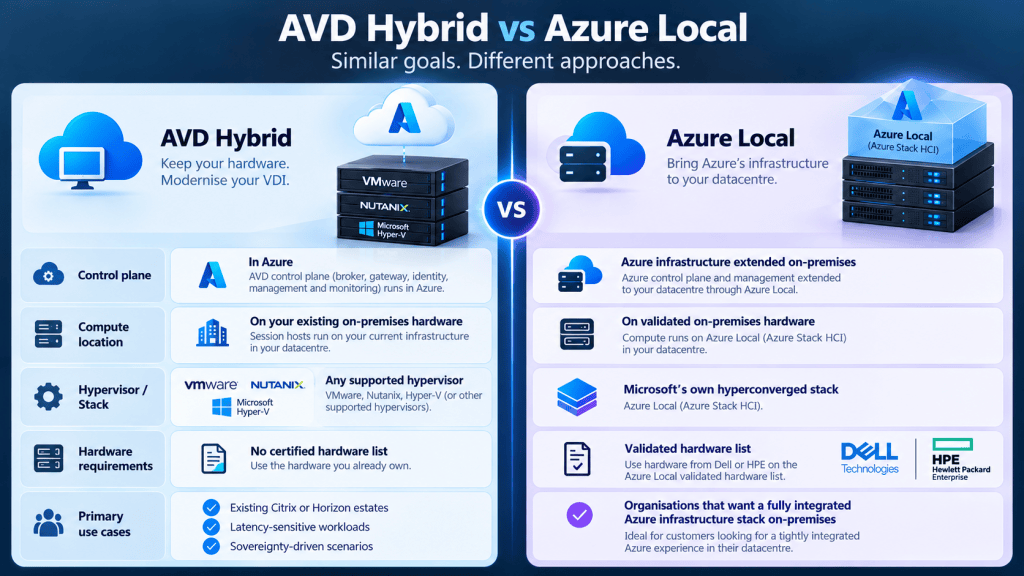
    I’ve had the same conversation three times this year, with three different customers who all have the same problem. They’re on Citrix, or Horizon, running on hardware they already own (VMware, Nutanix, or Hyper-V), and they don’t want to move to Azure Local. Azure Local means buying a specific validated hardware list from Dell or HPE and running Microsoft’s own hyperconverged stack on top of it. It’s a real product, but it’s a big, separate purchase, and for a lot of these customers, it’s the wrong answer to “get me off Citrix.”

    Azure Virtual Desktop Hybrid went generally available on 1 September 2026, and it’s built for exactly that gap. If you’re running AVD or thinking about running it, and you’ve got hardware you’re not ready to walk away from, this is worth fifteen minutes of your attention. Here’s what it actually is, why Microsoft only built it out to a certain point, and what that means for anyone deploying it without a partner behind them.

    What AVD Hybrid actually is

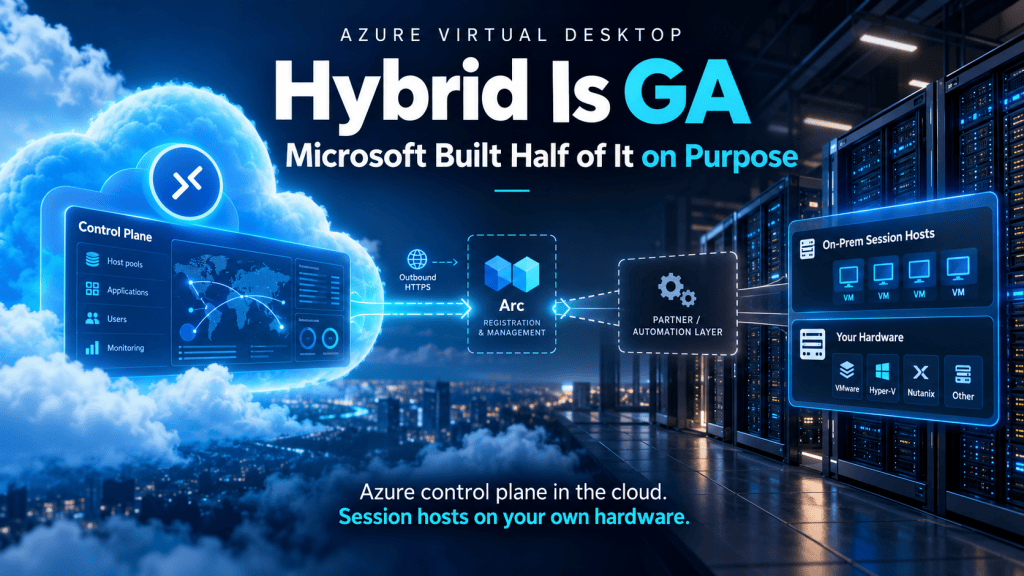
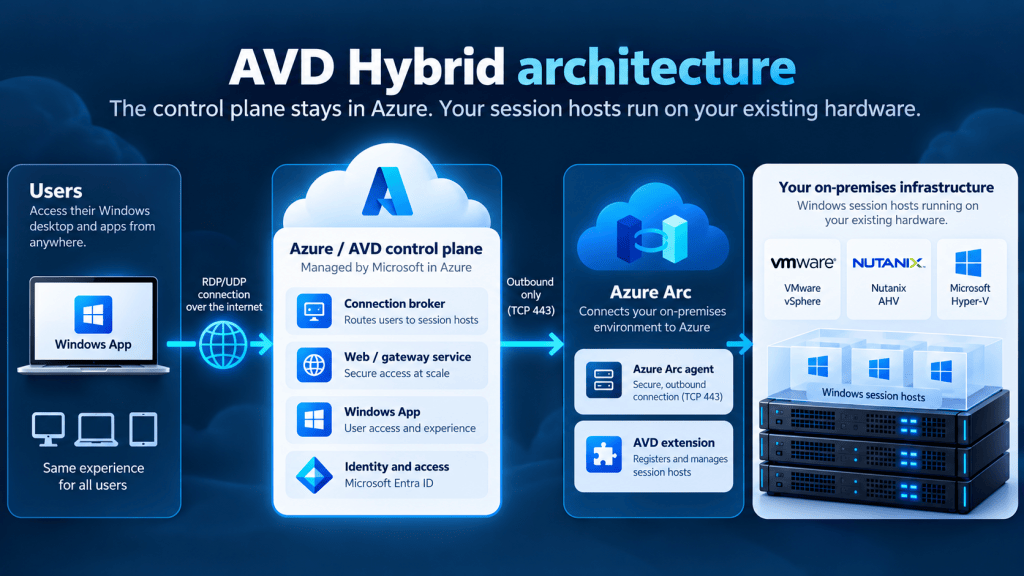
    Strip away the branding and it’s simple: the AVD control plane (brokering, the web/gateway service, Windows App connections) stays in Azure. The session hosts don’t. You run them on your own hardware, on whichever hypervisor you already have, and register them with Azure using an Azure Arc-enabled agent. Microsoft’s own description is blunt about it: you can run session hosts “on your preferred on-premises hypervisor that supports Windows virtual machines.” No certified hardware list, no proprietary stack to buy. You put the Arc agent on a VM, install the AVD extension, and it shows up in your host pool next to your cloud-hosted hosts.

    That’s the whole pitch, and it’s a genuinely different shape to Azure Local. Azure Local extends Azure’s control plane and management stack into your datacenter on hardware Microsoft has validated. AVD Hybrid does something narrower: it lets your control plane stay entirely in Azure while the compute stays wherever you already have it.
    Users connect the same way they do to any AVD session host: through Windows App, over the same protocol, with the same UI. That consistency is one of the things Microsoft calls out directly, and it’s not a small thing: your helpdesk doesn’t need a second runbook for “if it’s a hybrid session.”
    Why you’d actually use it

    Three scenarios have come up with real customers:

    You’ve got Citrix or Horizon on hardware you’re not ready to sunset. Modernising the broker and connection layer without a forklift migration to cloud compute is a genuinely attractive middle step, especially if that hardware still has years of depreciation left on it.

    Latency-sensitive or data-gravity workloads. CAD, medical imaging, anything where the session traffic needs to stay close to a local dataset. RDP ShortPath still gets you the local-network transport benefit, just without a public cloud hop for the compute.

    Regulated or sovereignty-constrained environments. Some organisations genuinely can’t put certain workloads in public cloud yet, for real regulatory reasons rather than habit. AVD Hybrid lets them get Azure’s management and identity story without moving the data.

    What it doesn’t solve is “we don’t want to touch the cloud at all.” The control plane is Azure, full stop, and your session hosts still need outbound connectivity back to Azure for brokering and management. If the objection is philosophical rather than data-residency-driven, this isn’t the escape hatch.

    The pros and cons, honestly

    Pros:

    • Uses hardware you already own, with no forced capex into a validated Azure Local hardware list
    • Arc-based registration is identity-driven and outbound-only over TCP 443; no inbound firewall holes, no site-to-site VPN required
    • One consistent user experience (Windows App) whether the host is in Azure, on-prem via Hybrid, or a Windows 365 Cloud PC
    • A genuine gradual migration path: move workloads to Azure compute later, on your own schedule, without changing how users connect

    Cons:

    • Windows 11 and Windows 10 Enterprise multi-session isn’t supported on Hybrid. Microsoft’s own licensing table for AVD Hybrid marks it “Not Supported,” full stop. If you want multiple users sharing session hosts on-prem, you’re on Windows Server with an RDS Client Access Licence, which is the same licensing weight Citrix and Horizon customers already carry today. It’s not a cost reduction on that front.
    • You still need reliable connectivity back to Azure. This isn’t an offline mode.
    • And the big one: Microsoft’s own documentation is explicit that AVD Hybrid “doesn’t provision or manage virtual machine state,” which means four things you’d normally take for granted on Azure-hosted AVD simply aren’t there.

    The gap Microsoft left, and why it’s deliberate

    That last point is worth sitting with, because it’s not a bug, it’s the design. Microsoft’s Learn documentation lists exactly what’s missing on a Hybrid host pool: power management, autoscale, Start VM on Connect, and Session Host Configuration. Their own words: “Organizations are responsible for deploying and managing their on-premises session hosts using hypervisor tools, scripts, partner solutions, or other tools.”
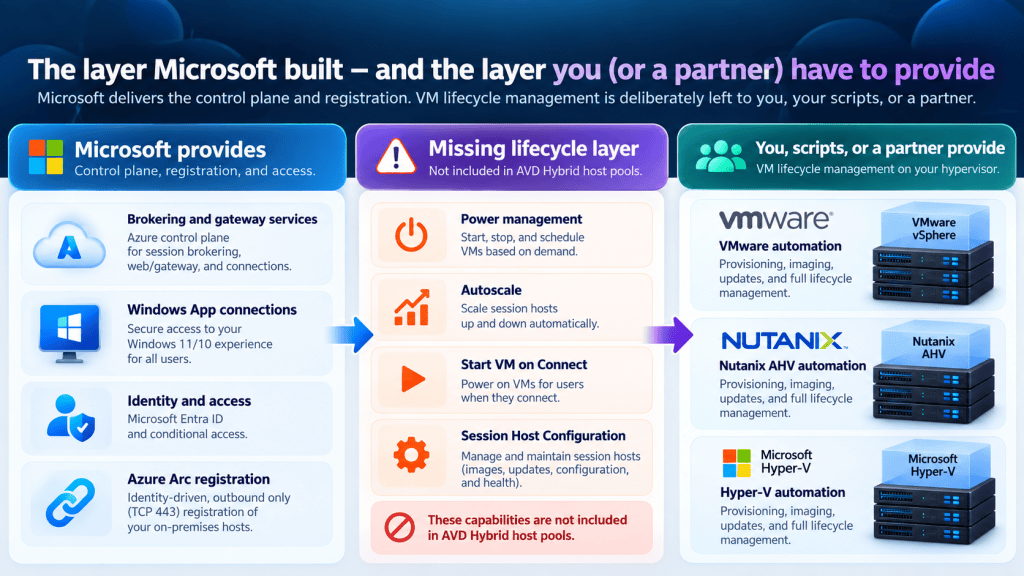
    Read that sentence again. Microsoft built the control plane, the Arc registration path, and the identity model, then explicitly handed off VM lifecycle management to whoever owns the hypervisor underneath: you, your scripts, or a partner. That’s not an oversight; it’s the same logic behind Azure Arc generally. Microsoft owns the thin registration and identity layer that has to be consistent everywhere, and leaves the deep, hypervisor-specific automation to the people who already know that hypervisor. Building native Nutanix AHV, VMware, and Hyper-V automation into the AVD product itself would mean maintaining three separate hypervisor integrations inside a first-party Microsoft product. That’s not where their engineering effort is best spent, and building AVD Hybrid this way is what let it ship across any hypervisor at GA rather than one.

    The practical result: without a partner layer on top, running AVD Hybrid at any real scale means someone on your team is scripting VM provisioning, image updates, and capacity management by hand, against whichever hypervisor API you’re on. That’s exactly the operational overhead most of these customers were trying to get away from when they started looking at moving off Citrix in the first place.

    What Nerdio Manager is doing about it

    This is where I have a direct line of sight, because Nerdio was a launch partner on AVD Hybrid alongside Microsoft. Nerdio Manager for Enterprise’s Hybrid support launched with Nutanix AHV as the first supported hypervisor, timed to Microsoft’s GA. What it adds on top of the bare Arc registration: image management (create, update, and deploy gold images for Hybrid session hosts the same way you would for Azure-hosted ones), automation for repeatable provisioning workflows, monitoring across your whole Windows cloud estate (Azure, Azure Local, and now Hybrid) from one console, and cost/utilisation reporting that spans all three.

    Nerdio hasn’t published a public timeline, but VMware and Hyper-V support are the expected next hypervisors after Nutanix, and I’d expect the same direction Nerdio already applies to Azure and Azure Local host pools: bring the automation Microsoft deliberately left out (autoscale, power management, lifecycle orchestration) up to the same standard, regardless of which hypervisor sits underneath. That’s the layer that turns “Microsoft gave you a registration path” into “you can actually run this without a team of scripters.”

    The takeaway

    AVD Hybrid GA is a genuinely useful option if you’ve got on-prem hardware you’re not ready to retire and a real reason (latency, sovereignty, depreciation schedule) to keep compute local while modernising everything around it. Just go in knowing Microsoft built the identity and control-plane layer, and left the VM lifecycle layer as someone else’s job. Check whether that someone is going to be you, with scripts, or a partner, before you commit a migration plan to it.

    If you’re running Citrix or Horizon on hardware you’re not ready to sunset, what’s actually stopping you from testing this? Genuinely curious whether it’s the licensing gap on multi-session, or something else entirely.
  • Nerdio Global Pools: From a Fixed Split to a Deliberate One

    Nerdio Global Pools: From a Fixed Split to a Deliberate One

    If you manage Azure Virtual Desktop at any real scale, you already know the uncomfortable truth about host pools: they don’t know who your users are. A host pool has capacity, a region, and a desktop image. It doesn’t have an opinion about whether the person connecting to it is in Manchester or Mumbai, whether they need the finance app set or the sales one, or whether the pool next door has spare capacity and this one doesn’t.

    For years the answer to “how do I place users properly across a large AVD estate” has been: manually, pool by pool, in a spreadsheet somewhere. Nerdio’s new Global Pools feature, currently in Public Preview for AVD Premium, is the first serious attempt to turn that into policy instead of a project. The preview lays the foundation of an MVP feature that has huge potential for how you manage your host pools.

    The feature you’re probably already running: Host Pool Business Continuity

    Before Global Pools, there’s a feature most Premium customers already have switched on (or should): Host Pool Business Continuity Multi-Region Setup. It’s worth starting here, because it’s the feature Global Pools is quietly built to go beyond.

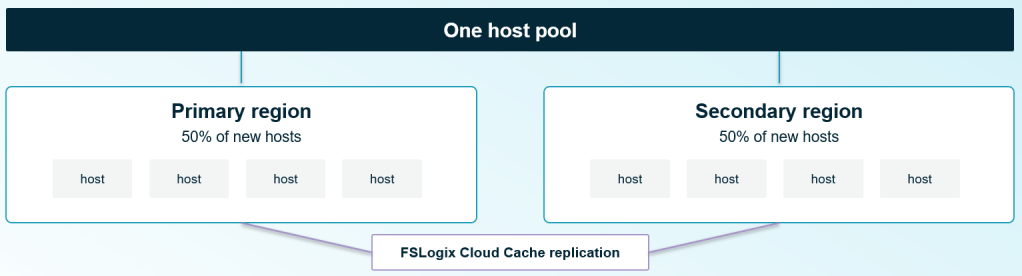
    It splits new VMs across a primary and secondary Azure region, evenly, and replicates FSLogix profiles between them using Cloud Cache. If a region goes down, users land in the surviving one. It’s a genuinely useful safety net, and it’s available today at host pool level.

    The catch is in that word “evenly.” The split is fixed at 50/50. There’s no weighting, and no way to choose which users go where. A user in Manchester has as much chance of landing in your secondary US region as a user based there already. The feature was built to survive a region failing, and it does that well, but it was never built to place people deliberately. It doesn’t know who the user is, or where they are; it just needs somewhere for them to land.

    That gap is exactly where Global Pools starts.

    What Global Pools actually is

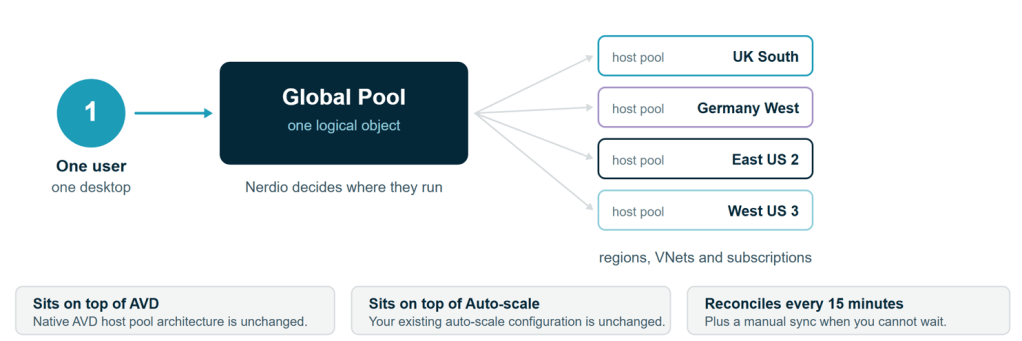
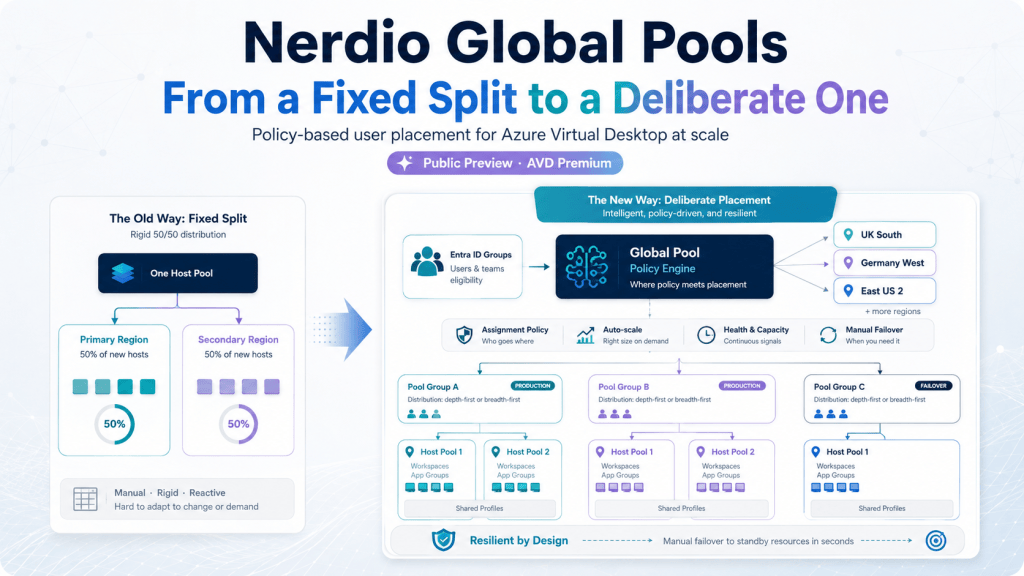
    Nerdio’s own description, from the published KB article: Global Pools let administrators group multiple AVD host pools under shared assignment and failover policies, so users are automatically routed to the right host pool instead of being managed one pool at a time.

    The important architectural point is what it doesn’t touch. Global Pools sits on top of native AVD host pool logic and on top of Nerdio’s own Auto-scale engine. Global Pools is a placement and policy layer, not a new kind of host pool.

    Two things worth knowing before you go looking for it: it’s currently Public Preview, and it’s Premium edition only.

    How it works, in practice

    Strip away the marketing and the mechanics are fairly plain:

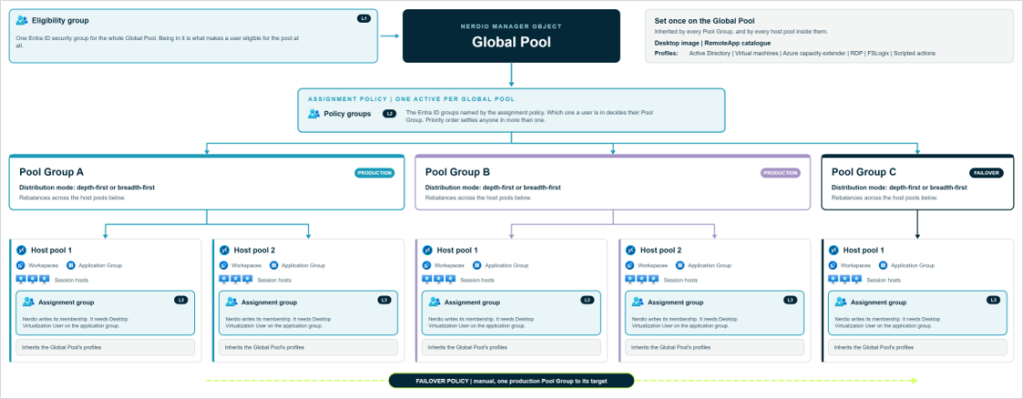
    • Assignment is driven by Entra ID group membership. You define policies that route members of specific Entra groups to specific Pool Groups (more on those in a second), with a configurable priority order for anyone who happens to sit in more than one group.
    • Pool Groups bundle one or more host pools together under a shared distribution mode (depth-first or breadth-first), and Nerdio automatically rebalances users across the host pools inside a Pool Group as capacity changes.
    • Sync runs every 15 minutes, automatically, with a manual sync button for when you don’t want to wait.
    • Auto-scale sizing can be percentage-based as well as the traditional fixed host count, useful if you want capacity to track the size of the pool rather than a hard number.
    • Failover policies redirect users from one Pool Group to another for planned maintenance or an outage. In the current release this is a manual cutover: an admin triggers it, it doesn’t happen on its own yet.
    • RemoteApps and the desktop image are defined once per Global Pool, not per Pool Group. The nice touch: you can build the RemoteApp catalogue as a placeholder before any host pool exists in the Global Pool at all. Native AVD doesn’t let you do that.

    None of that requires touching an API, incidentally, because there isn’t one yet. Everything is configured through the Nerdio Manager UI, and you’ll need the Nerdio Admin role to do it.

    Where this is meant to fit

    Nerdio names three scenarios for Global Pools, and they’re a reasonably honest description of who actually needs this:

    1. Large AVD deployments with enough host pools that manual per-pool assignment has stopped scaling.
    2. Failover between Pool Groups during planned maintenance or an outage.
    3. Organisations running multiple identity tenants who want one unified assignment model.

    What it doesn’t do yet

    Nerdio is upfront that this is Public Preview, and the documented gaps back that up:

    • Single-session desktops aren’t supported. If you’re running personal (1:1) host pools, Global Pools isn’t for them yet.
    • No import of existing host pools. Every host pool in a Pool Group has to be created fresh, one at a time, with its workspace and application group deployed manually. If you’re picturing dragging your current 200 host pools into a Global Pool this weekend, that’s not available yet.
    • Assignment is Entra group matching only. No percentage-based or attribute-based assignment, so you can’t yet say “60% of this group goes here, 40% goes there.” (Percentage-based auto-scale sizing is a separate feature and is available; don’t let the two get confused, because it’s an easy mix-up.)
    • Only core host pool profiles are supported inside a Global Pool: Active Directory, VM, and RDP/FSLogix. If your host pool profile relies on something outside that set, it’s not covered yet.
    • No public API yet. Everything is configured by hand in the Nerdio Manager UI.
    • Limited in-UI guardrails. Configuration issues like overlapping failover group membership aren’t flagged for you, so review your policy setup carefully before switching it on.

    None of that is a criticism. It’s a Preview feature, and Nerdio is treating it as one, which is the right call given how much is still moving underneath it.

    What to actually do about it

    If you’re running a handful of host pools, Global Pools probably isn’t solving a problem you have yet. If you’re managing dozens or hundreds across multiple regions, the shape of what Nerdio is building is worth understanding now, even before it’s something you’d put into production.

    Two practical steps:

    First, if you’re not already on it, check Azure Capacity Extender. It’s a separate, established Premium feature that lets you define fallback VM sizes when your preferred size runs out of capacity in a region. I’ve walked more than one customer through exactly that scenario this year, and it costs nothing unless it’s invoked, yet in a lot of estates it’s sitting there switched off. It solves a narrower problem than Global Pools (keeping a host pool running, not placing users across pools) but it’s available today and worth auditing regardless of where you land on Global Pools.

    Second, if you’re running enough host pools that manual assignment has become a real operational cost, get onto the Public Preview and give Nerdio feedback. The honest ask at this stage is “come and tell us what you need it to do,” not “go and build your architecture around this.” Preview features get shaped by the people willing to poke at them early. The gap between “staggered image rollout is listed as a scenario” and “staggered image rollout actually works” is exactly the kind of thing that gets closed faster when real admins are testing against real estates.

    Global Pools is trying to solve a problem that’s been genuinely unsolved in AVD: making user placement a policy decision instead of a spreadsheet. It’s not there yet. But the direction is right, and for anyone running AVD at real scale, it’s worth watching closely rather than waiting for the GA announcement to start paying attention.

    —

    Found this useful? I’d be glad to hear how you’re thinking about host pool placement at scale. Drop a comment, or find me at the next Nerdio event.