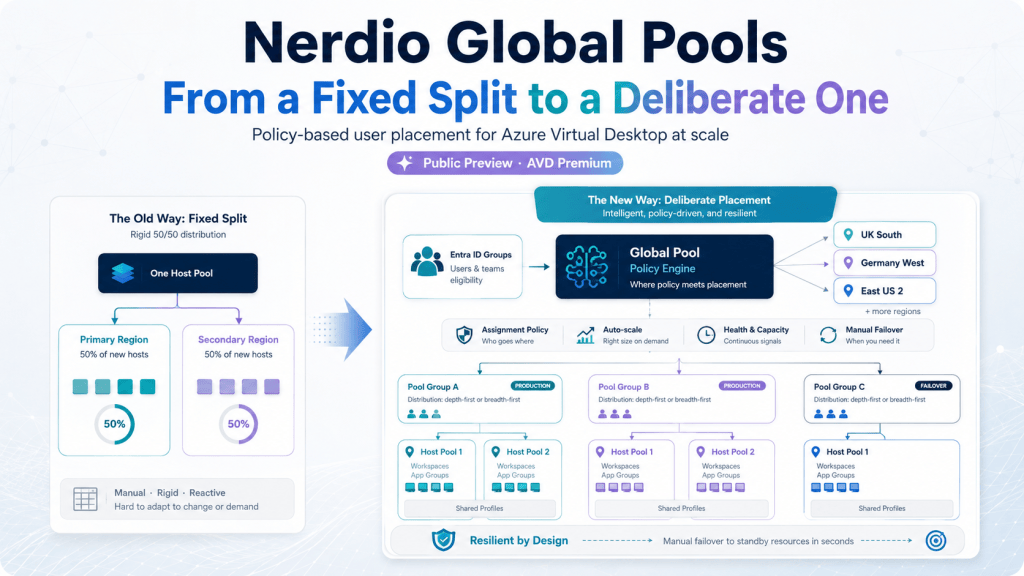
If you manage Azure Virtual Desktop at any real scale, you already know the uncomfortable truth about host pools: they don’t know who your users are. A host pool has capacity, a region, and a desktop image. It doesn’t have an opinion about whether the person connecting to it is in Manchester or Mumbai, whether they need the finance app set or the sales one, or whether the pool next door has spare capacity and this one doesn’t.
For years the answer to “how do I place users properly across a large AVD estate” has been: manually, pool by pool, in a spreadsheet somewhere. Nerdio’s new Global Pools feature, currently in Public Preview for AVD Premium, is the first serious attempt to turn that into policy instead of a project. The preview lays the foundation of an MVP feature that has huge potential for how you manage your host pools.
The feature you’re probably already running: Host Pool Business Continuity
Before Global Pools, there’s a feature most Premium customers already have switched on (or should): Host Pool Business Continuity Multi-Region Setup. It’s worth starting here, because it’s the feature Global Pools is quietly built to go beyond.
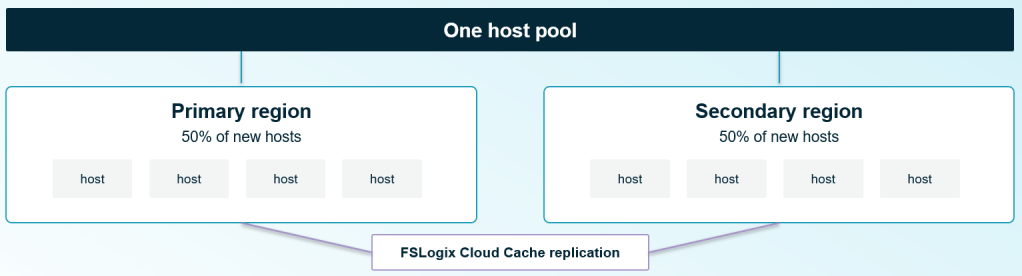
It splits new VMs across a primary and secondary Azure region, evenly, and replicates FSLogix profiles between them using Cloud Cache. If a region goes down, users land in the surviving one. It’s a genuinely useful safety net, and it’s available today at host pool level.
The catch is in that word “evenly.” The split is fixed at 50/50. There’s no weighting, and no way to choose which users go where. A user in Manchester has as much chance of landing in your secondary US region as a user based there already. The feature was built to survive a region failing, and it does that well, but it was never built to place people deliberately. It doesn’t know who the user is, or where they are; it just needs somewhere for them to land.
That gap is exactly where Global Pools starts.
What Global Pools actually is
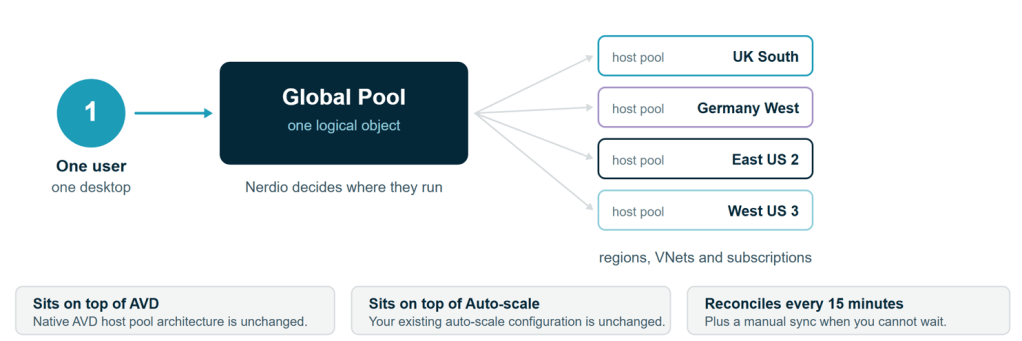
Nerdio’s own description, from the published KB article: Global Pools let administrators group multiple AVD host pools under shared assignment and failover policies, so users are automatically routed to the right host pool instead of being managed one pool at a time.
The important architectural point is what it doesn’t touch. Global Pools sits on top of native AVD host pool logic and on top of Nerdio’s own Auto-scale engine. Global Pools is a placement and policy layer, not a new kind of host pool.
Two things worth knowing before you go looking for it: it’s currently Public Preview, and it’s Premium edition only.
How it works, in practice
Strip away the marketing and the mechanics are fairly plain:
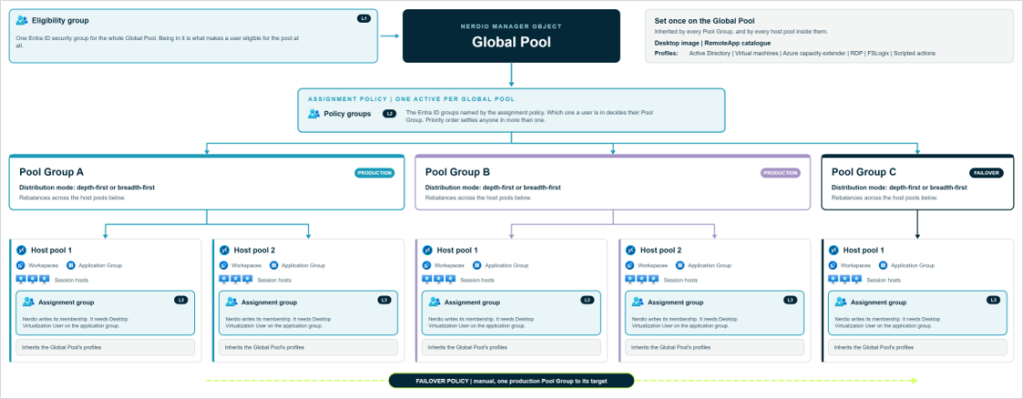
- Assignment is driven by Entra ID group membership. You define policies that route members of specific Entra groups to specific Pool Groups (more on those in a second), with a configurable priority order for anyone who happens to sit in more than one group.
- Pool Groups bundle one or more host pools together under a shared distribution mode (depth-first or breadth-first), and Nerdio automatically rebalances users across the host pools inside a Pool Group as capacity changes.
- Sync runs every 15 minutes, automatically, with a manual sync button for when you don’t want to wait.
- Auto-scale sizing can be percentage-based as well as the traditional fixed host count, useful if you want capacity to track the size of the pool rather than a hard number.
- Failover policies redirect users from one Pool Group to another for planned maintenance or an outage. In the current release this is a manual cutover: an admin triggers it, it doesn’t happen on its own yet.
- RemoteApps and the desktop image are defined once per Global Pool, not per Pool Group. The nice touch: you can build the RemoteApp catalogue as a placeholder before any host pool exists in the Global Pool at all. Native AVD doesn’t let you do that.
None of that requires touching an API, incidentally, because there isn’t one yet. Everything is configured through the Nerdio Manager UI, and you’ll need the Nerdio Admin role to do it.
Where this is meant to fit
Nerdio names three scenarios for Global Pools, and they’re a reasonably honest description of who actually needs this:
- Large AVD deployments with enough host pools that manual per-pool assignment has stopped scaling.
- Failover between Pool Groups during planned maintenance or an outage.
- Organisations running multiple identity tenants who want one unified assignment model.
What it doesn’t do yet
Nerdio is upfront that this is Public Preview, and the documented gaps back that up:
- Single-session desktops aren’t supported. If you’re running personal (1:1) host pools, Global Pools isn’t for them yet.
- No import of existing host pools. Every host pool in a Pool Group has to be created fresh, one at a time, with its workspace and application group deployed manually. If you’re picturing dragging your current 200 host pools into a Global Pool this weekend, that’s not available yet.
- Assignment is Entra group matching only. No percentage-based or attribute-based assignment, so you can’t yet say “60% of this group goes here, 40% goes there.” (Percentage-based auto-scale sizing is a separate feature and is available; don’t let the two get confused, because it’s an easy mix-up.)
- Only core host pool profiles are supported inside a Global Pool: Active Directory, VM, and RDP/FSLogix. If your host pool profile relies on something outside that set, it’s not covered yet.
- No public API yet. Everything is configured by hand in the Nerdio Manager UI.
- Limited in-UI guardrails. Configuration issues like overlapping failover group membership aren’t flagged for you, so review your policy setup carefully before switching it on.
None of that is a criticism. It’s a Preview feature, and Nerdio is treating it as one, which is the right call given how much is still moving underneath it.
What to actually do about it
If you’re running a handful of host pools, Global Pools probably isn’t solving a problem you have yet. If you’re managing dozens or hundreds across multiple regions, the shape of what Nerdio is building is worth understanding now, even before it’s something you’d put into production.
Two practical steps:
First, if you’re not already on it, check Azure Capacity Extender. It’s a separate, established Premium feature that lets you define fallback VM sizes when your preferred size runs out of capacity in a region. I’ve walked more than one customer through exactly that scenario this year, and it costs nothing unless it’s invoked, yet in a lot of estates it’s sitting there switched off. It solves a narrower problem than Global Pools (keeping a host pool running, not placing users across pools) but it’s available today and worth auditing regardless of where you land on Global Pools.
Second, if you’re running enough host pools that manual assignment has become a real operational cost, get onto the Public Preview and give Nerdio feedback. The honest ask at this stage is “come and tell us what you need it to do,” not “go and build your architecture around this.” Preview features get shaped by the people willing to poke at them early. The gap between “staggered image rollout is listed as a scenario” and “staggered image rollout actually works” is exactly the kind of thing that gets closed faster when real admins are testing against real estates.
Global Pools is trying to solve a problem that’s been genuinely unsolved in AVD: making user placement a policy decision instead of a spreadsheet. It’s not there yet. But the direction is right, and for anyone running AVD at real scale, it’s worth watching closely rather than waiting for the GA announcement to start paying attention.
—
Found this useful? I’d be glad to hear how you’re thinking about host pool placement at scale. Drop a comment, or find me at the next Nerdio event.

Leave a Reply