Don’t set it and forget it.
Auto-scale is one of the most powerful features in Azure Virtual Desktop.
It promises elasticity.
It promises cost control.
It promises performance stability.
But here’s the reality:
Most environments drift.
Auto-scale gets configured once — often during deployment — and then quietly left alone. Months later, usage patterns have changed, user numbers have shifted, and application behaviour has evolved… but scaling logic hasn’t.
That’s where Habit #4 comes in.
Highly effective Nerdio admins don’t treat auto-scale as a static configuration.
They treat it as a feedback loop.
Auto-Scale Drift Is Normal
Even well-designed environments don’t stay optimal forever.
Over time:
- Users join or leave
- Working hours shift
- Seasonal spikes come and go
- Applications change resource profiles
None of this means the original configuration was wrong.
It just means the environment evolved.
The problem isn’t drift.
The problem is ignoring it.
What Auto-Scale Insights Actually Do
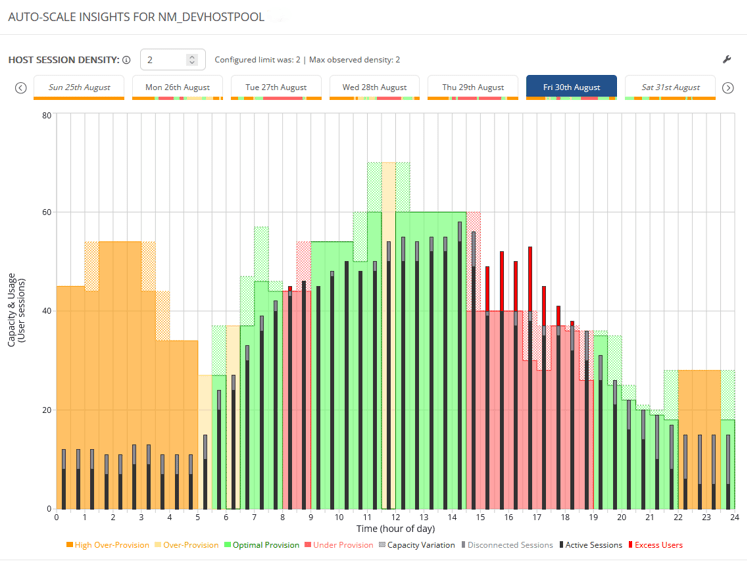
Auto-Scale Insights in Nerdio Manager for Enterprise surface where your configuration no longer reflects reality.
They highlight:
- Idle capacity
- Inefficient scaling schedules
- Burst logic that may be too conservative — or too aggressive
Insights don’t make changes for you.
They show you where opportunity exists.
They turn instinct into evidence.
The Three Pillars of Habit #4
Like the other habits, this one breaks down into repeatable behaviours.
You don’t need a dramatic reconfiguration.
You need a disciplined review.
Pillar 1: Review Insights Regularly
Auto-scale should have an operational cadence.
Highly effective admins:
- Review Insights monthly (or at minimum quarterly)
- Look for trends, not one-off anomalies
- Treat it like a performance and cost dashboard
Small adjustments made regularly compound over time.
What’s dangerous isn’t one imperfect configuration.
It’s leaving it untouched for a year.
Pillar 2: Validate Provisioning Against Real Usage
The question isn’t “Is autoscale enabled?”
The question is:
Does our current provisioning reflect how the environment is actually being used?
Review:
- Active and disconnected sessions per host
- Scale-out frequency
- Ramp, peak, and taper events
- Host counts during low-demand periods
As a general rule of thumb, sustained utilisation below ~60% often signals overprovisioning. Sustained utilisation above ~80% may indicate constrained performance.
The goal isn’t to chase perfect numbers.
The goal is alignment between capacity and demand.
Pillar 3: Optimise Safely, Not Aggressively
Cost optimisation should be invisible to users.
Highly effective admins:
- Adjust VM size incrementally
- Modify session limits gradually
- Tune burst thresholds cautiously
- Validate performance after changes
Aggressive optimisation introduces risk.
Disciplined optimisation builds confidence.
What This Enables
When Auto-Scale Insights are acted on consistently:
- Compute costs drop meaningfully
- Scaling becomes predictable
- Surprise overruns decrease
- Performance stabilises
More importantly, optimisation becomes a data exercise — not guesswork.
This aligns strongly with my broader emphasis on disciplined, data-driven decision making.
Common Mistakes to Avoid
Even experienced teams fall into these traps:
- Blindly applying every recommendation without context
- Optimising based on one week of data
- Ignoring seasonal workload patterns
- Tuning autoscale before stabilising images and applications
Order matters.
Autoscale optimisation works best when:
- Images are consistent
- Patching is predictable
- Applications are disciplined
That foundation makes scaling behaviour easier to interpret — and safer to adjust.
How Habit #4 Builds on the Foundation
Habit #4 doesn’t stand alone.
It builds on:
- Habit #1: Standardised image management
- Habit #2: Predictable patching
- Habit #3: Controlled application delivery
Only when the environment is stable does autoscale optimisation become safe.
Otherwise, you’re just scaling instability faster.
The Real Takeaway
Autoscale isn’t about turning machines on and off.
It’s about continuously aligning capacity with reality.
Set it.
Measure it.
Refine it.
That’s the habit.
Next up: Habit #5 — Analyse Auto-Scale History
Insights show what might be wrong. History tells you why.

Leave a comment