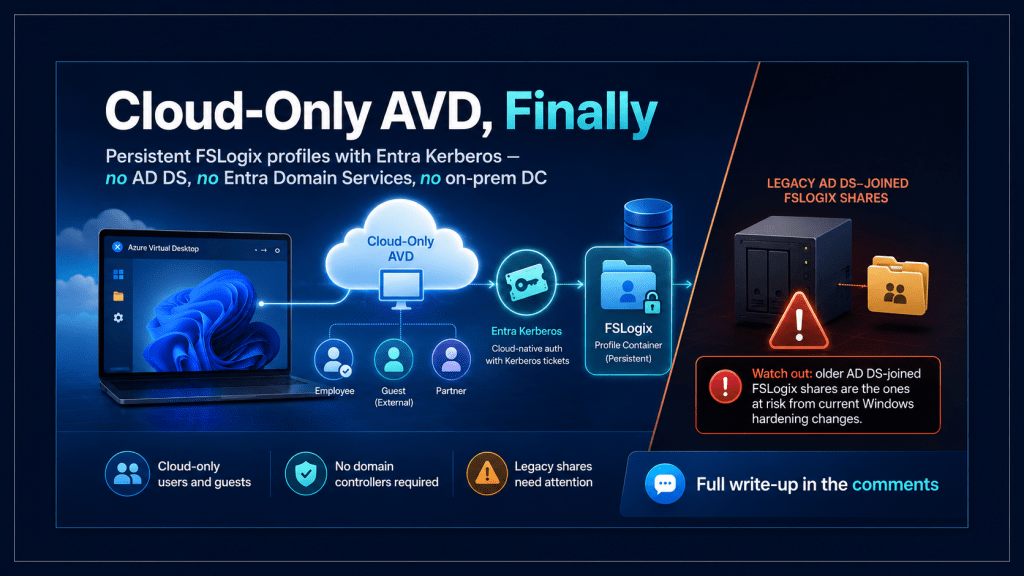
If you’ve ever tried to stand up Azure Virtual Desktop in a properly cloud-native tenant, with no on-premises Active Directory and no Entra Domain Services, you’ll know where it falls over. Not the session hosts. Not the networking. The profiles.
FSLogix has needed some form of Active Directory for years, which made it the one component that kept dragging a “cloud-only” AVD design back towards a domain controller. That’s now changed. FSLogix profile containers on Azure Files can authenticate with Microsoft Entra Kerberos, which means cloud-only users, and even external guest users, can get a real, persistent profile with no domain controller anywhere in the picture.
This post covers how to set that up end-to-end. It also covers the part that isn’t in the announcement posts: a Windows Kerberos hardening change landing in 2026 that can break FSLogix profile access on Active Directory-integrated storage, including shares you built years ago. It’s a good reason to understand the cloud-only path, because that path sidesteps the whole problem. Read that section before you touch production.
The problem cloud-only AVD always hit
FSLogix works by redirecting the user’s profile into a VHD(X) container on an SMB file share, then attaching it at sign-in. On a pooled host pool, that’s what gives a user the same desktop, settings, and Outlook cache on whichever session host they land on.
The catch was always authentication to that file share. Azure Files historically required on-premises AD DS or Entra Domain Services to handle the Kerberos side. In a tenant that had neither, your options were ugly: stand up Entra Domain Services purely to host profiles, or accept that cloud-only and guest users got a fresh temporary profile every session. No roaming, no persistence, no cached sign-ins. For a genuinely cloud-first organisation, that was the line item that stopped the whole design from being clean.
What Entra Kerberos changes
Microsoft Entra Kerberos lets Entra ID issue the Kerberos tickets needed to reach an Azure Files share over SMB, without any domain controller involved. Applied to FSLogix, which unlocks three identity types on Azure Files:
- Hybrid identities from Entra joined, or Entra hybrid joined session hosts, with no network line-of-sight to a domain controller. Supported in Azure commercial, Azure for US Government, and Azure operated by 21Vianet.
- Cloud-only identities (users who only exist in Entra ID and never in an on-premises AD).
- External identities (B2B guests invited into your tenant).
The cloud-only and external paths are supported in the Azure commercial cloud only. If you’re running in US Gov or 21Vianet, only the hybrid path is available to you, so don’t design around cloud-only profiles there.
The practical upshot: a pure Entra-joined session host can now load a persistent FSLogix profile for a user who has never existed in an on-premises directory. That’s the missing piece for cloud-native AVD, and it’s genuinely useful for any estate that hands desktops to contractors or partners as guests.
Read this first: the RC4 to AES-SHA1 change
Here’s the bit that isn’t in the launch coverage, and the reason I’d check your existing estate before building anything new.
Starting with the April 2026 Windows cumulative update, Kerberos default behaviour changes. When an Active Directory object’s encryption type is left unset (null), Windows defaults to AES-SHA1 instead of the legacy behaviour that often landed on RC4. This is a Windows platform security change tied to CVE-2026-20833, and to be clear, the Azure Virtual Desktop service itself isn’t being modified.
The thing to understand is what’s actually in scope. This affects FSLogix profile storage that authenticates over SMB integrated with Active Directory: on-premises AD, a NAS, a file server, or Azure Files joined to AD DS, where the relevant AD objects or service accounts are RC4-only or have encryption left null. If a dependent system doesn’t support AES-SHA1 for Kerberos, authentication can fail, and profiles can stop loading.
Notice what’s not on that list: a pure Entra Kerberos, cloud-only share. Entra Kerberos isn’t AD Kerberos, so by the mechanism described, the cloud-only path in this post sidesteps this particular change. The deployments most exposed are the older, domain-joined FSLogix shares, exactly the ones a cloud-native design is trying to move away from. If you’re migrating off a hybrid AD DS setup, the legacy share is the thing to remediate before you decommission it.
One caveat on that, because the two Microsoft sources don’t word it identically. The FSLogix product documentation states the warning more broadly: file shares hosting FSLogix containers that aren’t upgraded to AES-SHA1 might have access issues, and customers who have already moved to AES-SHA1 aren’t affected. The detailed hardening blog is the one that ties the actual mechanism to AD object encryption and AD-integrated SMB storage. I read the technical scope as AD-Kerberos paths, which is why I’m calling out the domain-joined shares specifically, but the safe operational rule Microsoft is pushing is simpler: make sure any Azure Files share holding FSLogix profiles is on AES-SHA1, and validate it, rather than assuming you’re exempt. If you’re not certain which Kerberos path a given share uses, treat it as in scope and check.
The timeline matters. From April 2026, enforcement mode is the default on domain controllers, with audit mode available as a manual rollback until July 2026. From July 2026, audit mode is removed, and enforcement is the only option. Microsoft recommends remediating by the end of June 2026, especially for non-Azure Files SMB storage and Azure Files with AD DS.
So before anything else: identify RC4 usage and null encryption settings on the AD objects tied to your FSLogix storage, move them to AES-SHA1, and validate sign-in and profile load end-to-end. Microsoft’s FSLogix blog (“Action required: Windows Kerberos hardening (RC4) may affect FSLogix profiles on SMB storage”) is worth ten minutes before any of the steps below.
Setting it up: the storage account
With that warning logged, here’s the build. Start with the Azure Files side.
First, a constraint that catches people out: a storage account can authenticate with one identity method only. Entra Kerberos, or AD DS, or Entra Domain Services, not a mix. If your account is already wired to AD DS for an existing share, you can’t bolt Entra Kerberos onto the same account.
The sequence on the storage account is:
- Create the storage account and an Azure Files share for the profiles, if you don’t already have them.
- Enable Microsoft Entra Kerberos authentication on the storage account. This creates the Entra ID app registration for the account and lets you assign permissions to Entra groups.
- Assign share-level permissions, either through the default share-level permission on the identity source page or with Azure RBAC roles.
- Configure the directory and file-level permissions for the profile containers, following Microsoft’s recommended FSLogix permission set, so users can create and use their own profile while admins retain management access. For cloud-only and external users, you do this through the Manage access control on the share.
- Grant admin consent to the new service principal, so users can request Entra tokens for the storage account.
- Disable multifactor authentication on the storage account.
That last one always raises an eyebrow, so it’s worth being clear about why. The Kerberos ticket is acquired silently during sign-in, and there’s no interface at that point to perform a step-up MFA prompt. If MFA is enforced on the storage account, the silent ticket request fails, and the profile won’t mount. You’re not weakening user sign-in MFA here; Conditional Access on the user still applies. You’re allowing the storage account’s own token acquisition to complete without a step-up, it has no way to satisfy.
Setting it up: the session host
Now the session host. The profile won’t attach until the host knows to fetch a cloud Kerberos ticket at logon.
Enable CloudKerberosTicketRetrievalEnabled using whichever of these fits your management approach:
- Intune Settings Catalog (the modern route): the Kerberos Policy CSP setting
CloudKerberosTicketRetrievalEnabled. Worth noting that Windows multi-session client editions now support this setting when it’s applied through the Settings Catalog, which wasn’t always the case. - Group Policy:
Administrative Templates\System\Kerberos\Allow retrieving the cloud kerberos ticket during the logon. - Registry, if you’re baking it into an image:
reg add HKLM\SYSTEM\CurrentControlSet\Control\Lsa\Kerberos\Parameters /v CloudKerberosTicketRetrievalEnabled /t REG_DWORD /d 1
Next, let the FSLogix credential keys roam. When you use Entra ID with a roaming profile, the Credential Manager keys have to belong to the profile that’s currently loading, otherwise you’re effectively pinned to one machine. Set:
reg add HKLM\Software\Policies\Microsoft\AzureADAccount /v LoadCredKeyFromProfile /t REG_DWORD /d 1
Then the FSLogix configuration itself. If your session hosts were built by the Azure Virtual Desktop service, FSLogix is already installed. Set the usual two values:
Enabled= 1VHDLocations=\\<storage-account-name>.file.core.windows.net\<file-share-name>
Sign in with a test account that’s been assigned to an app group on the host pool and has permission to the share. If it’s worked, you’ll see a directory on the share named like <user SID>_<username>. Use a fresh test account, or enable DeleteLocalProfileWhenVHDShouldApply, so an existing local profile doesn’t mask whether the container is actually mounted.
The cloud-only step everyone misses
If your users are cloud-only and you assign share access by Entra group, there’s one more step that is easy to skip and fails silently when you do.
You have to add an app manifest tag to the storage account’s Entra app registration so that Entra includes cloud-only group SIDs in the Kerberos ticket. Without it, Entra only puts on-premises group SIDs in the ticket; your cloud-only groups never appear, and group-based permissions to the share simply don’t take effect. No error that points to the cause, just access that doesn’t work.
In the app registration manifest, add kdc_enable_cloud_group_sids to the tags array. This step is mandatory for cloud-only identities. Hybrid identities don’t need it, which is exactly why it catches people moving from a hybrid design to a cloud-only one. The thing that worked before now quietly doesn’t, and the difference is one manifest tag.
External identities: real, but mind the preview line
External (guest) identity support is the newest part of this story, and it’s worth being precise about what’s actually shipped. Connecting to Azure Virtual Desktop and Windows 365 with an external identity is generally available. Using FSLogix to give those external identities a persistent profile is still in public preview.
That distinction matters if you’re planning a rollout. A contractor can sign in to your AVD environment today on a fully supported path. Giving them a roaming FSLogix profile that follows them across session hosts is the preview part, so treat it accordingly: pilot it with a small guest cohort, don’t promise it in a contract yet.
A few requirements specific to external identities are easy to miss. Microsoft Entra single sign-on must be configured for the connection. The session host has to be Entra joined and running Windows 11, version 24H2 or later with the September 2025 cumulative update (KB5065789) or newer. And for Azure Virtual Desktop, you also have to assign the Virtual Machine User Login Azure RBAC role to the external identity on the VMs they’ll sign in to, which you don’t have to think about for your own member users. It’s commercial-cloud only, like the cloud-only path.
Wrapping up
Cloud-only and external identity support for FSLogix removes the last real reason a cloud-native AVD design had to drag a domain controller, or Entra Domain Services, along for the ride. For genuinely cloud-first organisations, that’s a meaningful simplification, and for anyone serving guests, it opens a door that used to be shut.
Just sequence it correctly. If you’ve still got legacy FSLogix storage joined to AD DS, sort out the RC4 to AES-SHA1 migration on it before the Windows enforcement deadlines force the issue, because that’s the part that affects deployments you’ve already got running. The cloud-only Entra Kerberos path you’re building towards doesn’t carry that particular baggage, which is one more reason to make the move. And if your use case is external guests, remember the FSLogix profile piece is still in preview, so pilot before you promise.
If you’re running cloud-only AVD already, or about to, I’d genuinely like to know how the external-identity profiles are holding up for you. Drop a comment.

Leave a comment